


Download Widescreen Desktop Background Wallpapers of Vista Starter (Set 4)
The final set of the wallpapers extracted from Windows Vista Starter edition consists of 4 wide screen desktop background wallpapers with resolution size of 1600 x 1024. These wallpapers are tagged with Widescreen keyword and will appear under “Widescreen” section of “Windows Wallpaper” when selecting Desktop Background in Personalization, if they’re copy to C:\Windows\Web\Wallpaper (C may change depends on your drive letter).
Continue reading »
Windows Vista Fails or Unable to Hibernate Problem after Installing SP1
After installing Windows Vista SP1, consider lucky if you’re not encountering computer boots failure and cannot startup problem. However, there are more issues that may plagued Windows Vista SP1 upgraders. Another issue issue is computer system unable and cannot goes into hibernation after installing Windows Vista SP1.
Continue reading »
Windows Vista Starter Wallpapers Free Download with Preview (Set 3)
This is the third set of wallpapers from Windows Vista Starter edition. Download the ZIP archive package which contains 9 pieces of beautiful wallpapers if you like them. Extract and copy the .JPG wallpapers to C:\Windows\Web\Wallpaper (replace C with your own Windows drive letter) so that the newly added wallpapers will appear for selection on Personalization to set as desktop background. All wallpapers is of 1024×768 resolution, and of nature and scenery themes such as sunset, mountain, flower, seashell, wildlife and etc.
Continue reading »
Beautiful Vista Starter Desktop Wallpapers Free Download (Set 2)
Windows Vista Starter edition contains an unique set of great and beautiful wallpapers to use as desktop background, which totally different from desktop wallpapers packaged in higher end editions of Windows Vista. Here’s the second set of the wallpapers, all with resolution of 1024×768, 8 images in all with previews. After downloading the zip archive, unpack the JPG files and copy them to C:\Windows\Web\Wallpaper folder (where C is your Windows drive letter, change if applicable).
Continue reading »
Beautiful Wallpapers from Windows Vista Starter Desktop Background Free Download (Set 1)
Windows Vista Starter is the cheapest and lowest end edition of Windows Vista, with lots of functions and features been disabled or removed. One big significant difference is Windows Aero, a visual enhancement feature that exists in Windows Vista Ultimate and Home Premium, but not included in Starter edition. So you probably surprise that there are very beautiful high quality wallpapers that are included with Starter edition.
Continue reading »
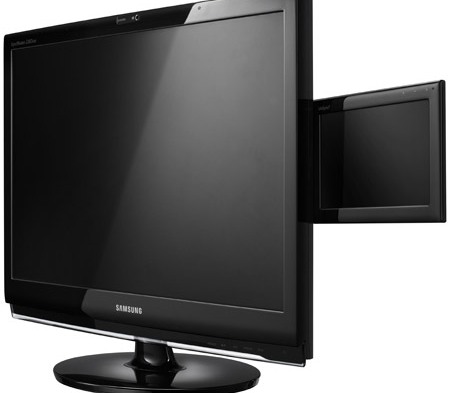
Samsung SyncMaster 2263DX Dual Multimedia LCD Display
Samsung has launched its new award winning, dual multimedia LCD display – SyncMaster 2263DX, consisting of 22” widescreen (1680×1050 resolution; 300 cd/m² brightness; 5ms response time; contrast ratio of 1000:1) and 7” widescreen (800×480 resolution; 200 cd/m²; 3ms response time; contrast ratio of 400:1) thanks to the DisplayLink’s USB Display Technology, aiming to allow secondary applications and programs including instant messenger, movie/music player, web browser, photos, or widgets, run without distracting from the main work display.
Endless Reboot Loop While “Configuring Updates: Stage 3 of 3” During Vista SP1 Installation
In the middle of the process to install Windows Vista SP1, when the on-screen status message showing “Configuring updates: Stage 3 of 3 – 0% complete”, the system will suddenly going into shutdown and reboot. Worse still, after computer starts up again, it will comes to the same configuration screen, and goes into reboot again. The computer restarts error repeated itself again and again, causing endless reboot loop. The symptom also happens when boot into Safe Mode. Of course, the service pack update is not installed successfully.
Continue reading »
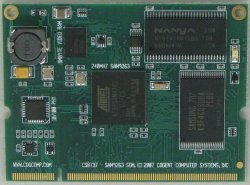
Cogent Launches SODIMM-based System-on-Module PC for Embedded Market
Have you even seen computer module that can be plugged into SODIMM interface? SODIMM interface is typically designed for external memory module to be plugged on the motherboard. But now the 200-pins interface usage has been extended to support the main core processor so that it is upgradeable in a later stage when existing processor no longer suits your need. Known as CBS737, the SOM (system-on-module) is developed by Cogent Computer Systems and is ready for embedded market.


Recent Articles
- How To Download HBO Shows On iPhone, iPad Through Apple TV App
- Windows 10 Insider Preview Build 19025 (20H1) for PC Official Available for Insiders in Fast Ring – Here’s What’s News, Fixes, and Enhancement Changelog
- Kaspersky Total Security 2020 Free Download With License Serial Key
- Steganos Privacy Suite 19 Free Download With Genuine License Key
- Zemana AntiMalware Premium Free Download For Limited Time