


IOGEAR USB Laptop KVM Switch
If you have more than one computer, either laptop or desktop, you might look for a solution that enables to connect two computers for easy working or file transferring. IOGEAR’s USB Laptop KVM Switch combined hardware and software solution that allows users to connect two computers via USB without any software or program installations.
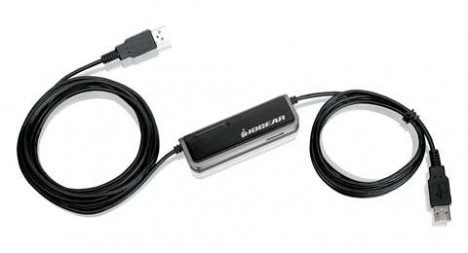
Key features of the USB Laptop KVM Switch
- Control and work on two computers (laptop-to-laptop, PC-to-PC, or laptop-to-PC) conveniently at the same time from one computer as a console.
- Built-in File Transfer Utility in the switch for backing up, updating and transferring files effortlessly between the connected computers without installation of any software in the computers.
- The portable USB 2.0 cable design comes with a total length of nine feet USB cable (three feet on one end and six on the other end).
- Desktop Image Scaling resizes your desktop image automatically onto your screen.
- User-friendly on-screen toolbar with multiple functions for file transfer, desktop image scaling and others.
- An extra USB 2.0 port is provided at the switch for USB devices such as a printer or an external storage drive.
- Easy to use with ‘Plug & Play’ and no power adapter is needed.
- Support Windows XP and Vista operating systems.
The USB Laptop KVM Switch is available now at about USD$75.


Recent Articles
- How To Download HBO Shows On iPhone, iPad Through Apple TV App
- Windows 10 Insider Preview Build 19025 (20H1) for PC Official Available for Insiders in Fast Ring – Here’s What’s News, Fixes, and Enhancement Changelog
- Kaspersky Total Security 2020 Free Download With License Serial Key
- Steganos Privacy Suite 19 Free Download With Genuine License Key
- Zemana AntiMalware Premium Free Download For Limited Time
Tags
amazon
Android
apple
Apple iPad
Apple iPad mini
Apple iPhone
Apple iPhone 5
Apple iPod touch
Apple iTunes
Ashampoo Burning Studio
AVG Internet Security
BitDefender Internet Security
F-secure
Facebook Home
Free
Google Apps
Google Chrome
Google Maps
Instagram
iOS
iOS 7.1
iOS 8
iOS 9
ios 9.1
iOS 9.3
LG
Mac OS X
microsoft
Microsoft Office 365
Microsoft Office 2010
Microsoft Office 2013
Microsoft Office 2016
Microsoft Surface
Mozilla Firefox
Samsung
Skype
WhatsApp
Windows 7
Windows 8
Windows 8.1
Windows 10
Windows Vista
Windows XP
WordPress
YouTube