


Workaround to Re-Open Last Opened Tabs When Exit The Next Time Using Internet Explorer in IE8 Beta 1
 Internet Explorer 7 (IE7) has a very useful feature that allows users to re-open the tabs the next time using Internet Explorer web browser with all web pages reloaded as when the IE window is closed. Typically, IE7 will ask for confirmation when there is multiple tabs open when users attempt to close or exit from IE7, and there is a “Open these the next time I use Internet Explorer” check box that users can select to reopen all existing tabs that are closed when IE7 is run again.
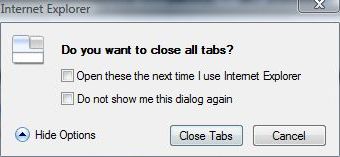
However, in Internet Explorer (IE8) Beta 1, the useful feature (although still inferior to Firefox) has been removed. It’s not sure whether it’s a temporary removal or whether option to re-open tabs after closing window with tabs opened feature will come back on final release of IE8.
However, IE 8 Beta 1 adds (or copies from Firefox) another useful feature which allows users to recover the last opened tabs if the IE web browser crashes or closes unexpectedly, or forces exit by users when the window not responding or hang. After IE8 crashes with whole window or IE frame exits, the following dialog box will appear when users restart or run IE8 again.
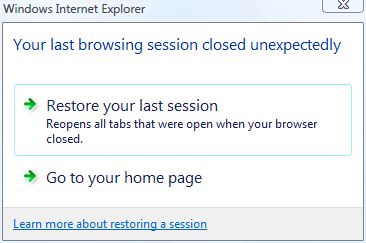
Thus, the workaround to to restore last opened tabs on next IE session to re-open tabs that appear before closing the IE8 browser window is to make the Internet Explorer processes exit as if it’s crashing or been terminated. To terminate IE8 process, users can use Task Manager to do the termination task.
To open Task Manager, type taskmgr in Run command or Start Search box, and press Enter key. In IE8, each tab has its own process, which further separated from process of IE8 window frame and broker object, in a feature called Loosely-Coupled IE (LCIE) by Microsoft.
The multiple iexplore.exe processes running makes the job to crash exit or terminate the IE in failure manner harder. One trick is that terminating the process for IE window frame and broker object will also lead to exit and termination of processes for all other child tabs within that window. One observation is that the process for the IE window frame is generally the one that has CPU usage when no other web pages is loading (watch out for and don’t be fooled by website consisting dynamic contents), and has low memory utilization, typically lowest among all process depending on the type of web pages loaded and between 6,000 KB to 12,000 KB in memory usage size.
Once such main core iexplore.exe process is identified, select it and click on End Process button to terminate it. Users will see whole IE window disappears and crashes out. Don’t worry if you terminate the wrong iexplorer.exe process, IE8 auto recovery feature also support recovering the individual tab ‘crashed’, including those terminated purposely by user. In such case, you will see the hard closed tab automatically reopens.
Once the whole Internet Explorer 8 window with all opened tabs is terminated, the next time IE browser is run, IE will prompt to ask whether user want to restore the last session or discard the history to go to default homepage, as shown in figure above.
Alternatively, to avoid such hassle, simply save all tabs into a folder in Favorites by choosing Add Current Tabs to Favorites, and when re-open IE8, select the folder and press “Ctrl-Enter” keys to open all URL links inside the folder to tab group. Or you can right click on the Favorites folder and choose Open in Tab Group, or simply click on green right arrow after the saved folder.
Update: Reopen Last Browsing Session feature has been added to IE8, rendering trick above is not required.


Recent Articles
- How To Download HBO Shows On iPhone, iPad Through Apple TV App
- Windows 10 Insider Preview Build 19025 (20H1) for PC Official Available for Insiders in Fast Ring – Here’s What’s News, Fixes, and Enhancement Changelog
- Kaspersky Total Security 2020 Free Download With License Serial Key
- Steganos Privacy Suite 19 Free Download With Genuine License Key
- Zemana AntiMalware Premium Free Download For Limited Time