
Windows Vista 0×80070426 Activation Service Not Started or Validation Not Genuine Error

When validating Windows Vista for genuine check, error code 0×80070426 with description “This copy of Microsoft Windows is not genuine” appears even though the copy of Windows Vista is legitimate. Similarly, when try to download and install latest updates from Windows Update, system prompts not all updates could be installed, and later says that an illegal chance was made or version of Windows Vista is invalid. In this symptom, using WGA Diagnostic Tool will return online validation code of 0×80070426 and invalid license validation status.

Error message 0×80070426 normally indicates that Software Licensing service is not running. Microsoft help associates error code 0×80070426 with description “The service has not been started.” The Software Licensing service enables the download, installation and enforcement of digital licenses for Windows and Windows applications. If the service is disabled, Windows and licensed applications may fail to get proper validation and activation.

To check whether the Software Licensing service is running and start it if it’s not already running, and ensure the service is always started up in future, perform the following procedure:

  1. Click Start and type Services or services.msc in the search box and then click on Services under Programs section of the search results on top pane.
  2. If User Account Control ask your permission to continue, click Continue. If UAC asks for administrator’s password, enter a valid password.
  3. Scroll down the list to the service Software Licensing and double-click it.
  4. In the properties window of the Software Licensing service, set Startup type to Automatic.
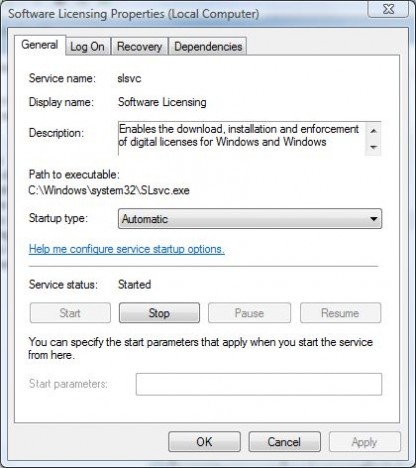
    SLSvc Software Licensing Service

  5. Click Start to start the service. If the status is already running, click the Stop button and confirm with Yes to stop the service. Restart the service by clicking the Start button.
  6. Click OK to exit from Software Licensing’s Properties window and close the Services window.
  7. Go to www.microsoft.com/genuine and click the Validate Windows button to re-validate Windows. If you have problem with system updates, re-initiate system update.

The Software Licensing service can also be started with command prompt on high privilege elevation mode with the following command:

net start slsvc.exe



3 Responses to “Windows Vista 0×80070426 Activation Service Not Started or Validation Not Genuine Error”

  1. Tim
    February 14th, 2009 07:56
    3

    I tried this and when I try to restart the service through services.msc it gives me the same error message and won’t restart.

    With the elevated cmd prompt it tells me the service name is invalid

  2. Sue
    December 23rd, 2008 09:45
    2

    Went through these steps and the service indicated it was running. I stopped and restarted it and still my screen says my copy is not genuine. I bought this copy of Windows on a laptop custom made by a respected PC manufacturer. I don’t know what else to do, so I’ll get help from their tech support people. It’s always something when it’s microsoft!

  3. Windows Vista Activation Errors - Causes and Fixes » Tip and Trick
    April 30th, 2008 09:47
    1

    [...] Error 0×80070426 indicates that Software Licensing service (SLsvc.exe) may not be started or stopped working. Restart the service. Refer to the guide on 0×80070426 fix here. [...]

Leave a Reply

You can use these tags: <a href="" title=""> <abbr title=""> <acronym title=""> <b> <blockquote cite=""> <cite> <code> <del datetime=""> <em> <i> <q cite=""> <strike> <strong>

Subscribe to comments feature has been disabled. To receive notification of latest comments posted, subscribe to Tip and Trick Comments RSS feed or register to receive new comments in daily email digest.
Custom Search

Incoming Search Terms for the Article

80070426 - This copy of windows is not genuine - WindowsUpdate_80070426 - 0x80070426 - error code 0x80070426 - windows activation error 0x80070426 - windows activation service - windows update 80070426 - WindowsUpdate 80070426 - error 80070426 - code 80070426 - "This copy of windows is not genuine" - validate windows vista - net start slsvc - windows update error 80070426 - windows vista not genuine - error code 80070426 - vista not genuine - vista 80070426 - WINDOWS NOT GENUINE - windows error code 80070426 - vista error code 0x80070426 - windows activation error 80070426 - error 0x80070426 - all - slsvc.exe disable - 80070426 vista - disable SLsvc.exe - slsvc not starting - windows vista activation service - start windows activation service - slsvc vista - the software licensing service could not be started - this copy of windows is not genuine vista - windows vista error code 80070426 - software licensing service could not be started - windows vista activation - 80070426 windows update - vista activation service - windows activation service not running - vista slsvc - windows activation error code 0x80070426 - windows activation service not started - 80070426 fix - vista error 80070426 - vista 0x80070426 - vista activation error 0x80070426 - error code 0x80070426 vista - 0x80070426 vista - "The Software Licensing service could not be started" - WindowsUpdate _ 80070426 - "WindowsUpdate_80070426" - windows is not genuine vista - windows vista is not genuine - vista windows not genuine - SLsvc - not genuine vista - vista - activation licensing service stopped working - windows error 80070426 - code 0x80070426 - 80070426 error - activation error 0x80070426 - fix error 80070426 - vista is not genuine - windows vista update error code 80070426 - 0x80070426 service not started - 0x80070426 the service has not been started - error code 80070426 windows vista - windows - windows activation service vista - windows activation services - windows not genuine vista - software licensing service vista - "WindowsUpdate _ 80070426" -
