
What’s the Login User Name and Password for VMWare Server 2.0?

VMWare Server 2.0 (currently in Beta 2 release) has departed significantly from legacy VMWare Server 1.0. It’s still a free virtualization software to users to create, manage and run virtual machines, but instead of usual standalone desktop (or notebook laptop) based application, VMWare Server 2.0 now runs solely on web-based management user interface, plus many other new features, enhancements and improvements.

To log in to VMWare Server 2.0, users will have to access https://localhost:8333/ui/ or http://localhost:8222/ui/ for non-secure connection (the URL may takes the form of your computer name) with a web browser to come to VMware Infrastructure (VI) Web Access management interface, which is VMWare Server Console, normally simply call Web-UI. Don’t worry about your system doesn’t have a web server such as Apache or Microsoft IIS running, VMWare Server 2.0 install Tomcat web server in the background.

But users will come to a VI Credentials page asking for Login Name and Password, as shown in the screenshot below.
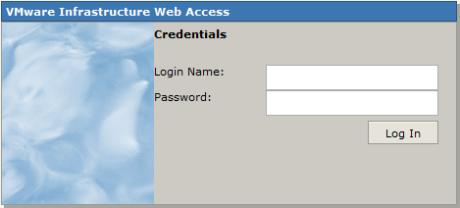
VMWare Server 2.0 Login Screen

What login user name and password to use? This probably your first installation of VMWare Server 2.0, and even if you have installed VMWare Server 1.0 before, it never ask for creation of any user account or its user ID or password during installation of whatever versions. And searching up and down in Start Menu’s VMWare Server program folder doesn’t reveal any program to create or manage user’s login name for VMWare console too.

Actually, VMWare Infrastructure Web Access, and hence VMWare Server 2.0, uses user account of the operating system, i.e Windows XP, Windows Vista, Windows Server 2003, Windows Server 2008 and Linux distro. So to login to VMWare Server 2.0 Web Console, logon with an administrative account’s user name of Windows or Linux (Administrator or root) and the corresponding password. Note the password is a must. In Windows, most built-in Administrator account does not have password by default even after been enabled, and so a password must be assigned.

It’s possible to create and add another user account with administrator’s privileges specially for VMWare Server login purpose.



42 Responses to “What’s the Login User Name and Password for VMWare Server 2.0?”

Pages: [2] 1 » Show All

  1. pppp
    August 21st, 2009 16:21
    42

    just add user to vmware group and working fine…

  2. Suri
    August 18th, 2009 18:52
    41

    Thanku post 32

  3. Praba
    August 1st, 2009 20:39
    40

    Hi

    tks a lot

  4. Stephen
    July 29th, 2009 03:01
    39

    Mathew – I couldn’t agree more. I’ve been a real fan of all things VMWare until now. I’m going to download VirtualBox, and remove VMware Server.

  5. Matthew
    July 28th, 2009 09:55
    38

    VMware server is the worst program ever. I’d consider myself a fairly competent VM user having tried most of the main apps like VMware Player, Qemu, VirtualBox, etc. I’ve spent the last hour trying to get this garbage installed just to land on a subvertly installed TomCat server which I absolutely did not want.

    Anyone else who’s completely let down by this VM app, just download the VMware Player and use EasyVMX.com and save yourself a lot of trouble. SOOOO MUCH EASIER.

    P.S. or better yet, just use VirtualBox, since it’s faster, provides a user-friendly interface and it’s FREE (ie open source/free)

  6. WillBeen
    May 20th, 2009 04:21
    37

    I m using a Ubuntu distrib and I dont have a root password, so I found another solution to log with my user “will”.

    Edit the file
    /etc/vmware/hostd/authorization.xml
    and edit the line :
    root

    so it becomes :
    will

    then restart vmware :
    sudo service vmware restart

    OK, you can log into user “will” !

  7. Randy
    May 19th, 2009 09:16
    36

    Thank you so much!! I was wandering really hard were did vmware asked me for a username and password!

  8. jrj
    May 14th, 2009 21:44
    35

    This web interface is such a stupid idea from VMware … aargh. Anyway, thanks to the author of this blog.

  9. geek
    May 11th, 2009 23:13
    34

    Thanks for the post. I had to waste a lot of time figuring out the password, as this was the first time I am using VM server.

  10. warrio
    April 26th, 2009 04:33
    33

    defaut user=root
    password you reset password root

    #sudo passwd root

  11. dede
    March 25th, 2009 17:53
    32

    Your system admin login and password

  12. Chris
    March 17th, 2009 07:10
    31

    I don’t have the root password to my linux box as we have LDAP set up. Any clue to how to bypass this login/password issue with VMware 2.0?

  13. Webagentur
    March 17th, 2009 00:56
    30

    What is the admin account for the vmware? I can it not find.

  14. car floor jacks
    March 14th, 2009 20:16
    29

    I have to say, I can not agree with you in 100%, but it’s just my opinion, which indeed could be wrong.
    p.s. You have a very good template for your blog. Where have you got it from?

  15. Donna
    March 14th, 2009 07:28
    28

    I really enjoy blogs like this, since I am a blog addict I will visit again soon.

  16. Backlink Builder
    March 11th, 2009 06:49
    27

    It really is amazing that some things never change

  17. Luke
    March 10th, 2009 08:05
    26

    Sancho, thankyou, creating a new ADmin user worked.

Pages: [2] 1 » Show All

Leave a Reply

You can use these tags: <a href="" title=""> <abbr title=""> <acronym title=""> <b> <blockquote cite=""> <cite> <code> <del datetime=""> <em> <i> <q cite=""> <strike> <strong>

Subscribe to comments feature has been disabled. To receive notification of latest comments posted, subscribe to Tip and Trick Comments RSS feed or register to receive new comments in daily email digest.
Custom Search

Incoming Search Terms for the Article

vmware server login - vmware server password - vmware server default password - vmware server 2 default password - vmware default password - vmware server 2.0 login - vmware server default login - vmware server 2 login - vmware server 2 default login - vmware server 2.0 default password - vmware server login password - VMware infrastructure web access password - vmware 2.0 login - vmware server username password - vmware server 2 password - vmware server username - vmware login - vmware server login name - vmware default login - vmware server 2.0 password - vmware 2.0 default password - VMWare server default user - vmware server username and password - vmware server default username password - vmware server default username - default VMware server password - VMware 2.0 password - vmware server web access password - vmware server 2 login name - vmware server user password - vmware 2.0 default login - vmware infrastructure web access login name - vmware server default username and password - VMware Infrastructure Web Access default password - vmware web access password - vmware server 2 login password - vmware infrastructure default password - vmware login name - vmware 2 login - vmware server 2.0 Login name - vmware server logon - VMware default username password - vmware server login name password - VMware Server 2.0 default login - vmware login password - vmware 2 default password - vmware server 2 default user - vmware username password - vmware server 2 username password - login vmware server - vmware server 2 default username - vmware server 2 default username password - vmware server web access login - vmware web access default password - vmware server 2 username - vmware server 2.0 username - vmware default username and password - vmware default username - login vmware - vmware 2.0 username password - vmware web access login name - vmware infrastructure web access login - default password for vmware server - default password vmware - VMware server login - vmware 2 default login - vmware server user name password - vmware server 2.0 username password - vmware username and password - vmware server web login - default vmware login - default password vmware server - vmware infrastructure default login - password vmware - vmware server 2.0 default username -