
Test the Strength of Passwords Chosen

Users are often required to give passwords to access personal information that is stored in a computer or online account. What are the elements which constitute a strong password that can reduce the possibility of hackers or information thieves cracking into your system and stealing your private data? We have discussed this in our previous post and suggested the use of the password chart to create a strong password. Once you have created your password, you can actually test its strength or safety with some online applications.

Microsoft provides a facility called Password Checker which allows users to test how strong is their chosen password. Users can go to Password Checker online and key in their password. The program will indicate whether the password chosen is weak, medium, or strong.

Use Password Checker to test your password’s strength.

The Password Meter web utility tests the strength of your passwords as you type it, scoring your password strength based on a number of positive and negative password attributes. The test measures the number of characters, type of characters used, and the order of characters in your password. (Sequential letters or numbers, for example, equals weak passwords). Toss your favorite high-security password into this tool—you may be surprised at how it fares.
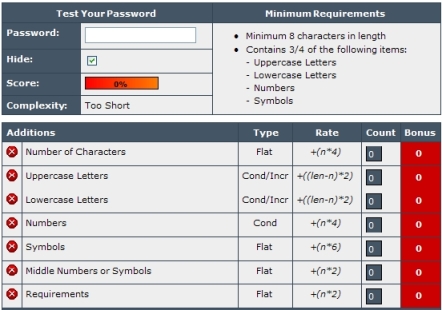
Screenshot of Password Meter



4 Responses to “Test the Strength of Passwords Chosen”

  1. Technology Hacker
    April 15th, 2008 15:54
    4

    This works very well.I am using it since 3 months..Awsome utility by Microsoft.

  2. Test the Strength of Passwords Chosen (Excerpt) » My Digital Life
    April 10th, 2008 15:06
    3

    [...] reading Test the Strength of Passwords Chosen at Tip and [...]

  3. Deyaa Addeen Fahmy
    April 1st, 2008 14:03
    2

    Thank U very much .

  4. Create a Secure and Strong Password using Password Chart » My Digital Life
    March 31st, 2008 22:59
    1

    [...] Also read Test the Strength of Passwords Chosen [...]

Leave a Reply

You can use these tags: <a href="" title=""> <abbr title=""> <acronym title=""> <b> <blockquote cite=""> <cite> <code> <del datetime=""> <em> <i> <q cite=""> <strike> <strong>

Subscribe to comments feature has been disabled. To receive notification of latest comments posted, subscribe to Tip and Trick Comments RSS feed or register to receive new comments in daily email digest.
Custom Search

Incoming Search Terms for the Article

password strength tester - password - password strength test - password tester - flex password strength - password strength chart - test password strength - password tester download - javascript password strength tester - iphone password strength tester app - all - google password tester - password strength javascript - password strength utility - test password online - online password tester - password strength flex - pasword test - test password - flex password strong - pasword - medium strength password - google passworD safety checker - websites for testing strength of passwords - google password strength test - test password strong - test of strength - pasword tester - password strength test download - trick password tester - password strength test microsoft - online password test - javascript test for strength of password - javascript password strength test - strength of passwords - test strength password - flex weak strong password - javascript password strength meter - microsoft password strength tester - password strenght tester - download+Test strength password - how are passwords chosen - xp sp3 - pcouffin.sys - software to testing weak password - acid3 - characters & "password strength" - strength pasword - password strength torrent - why we are usingpassword strength checker -