


How To Make iPhone Read Text Aloud with Just a Few Taps
With the launch the next version of iOS mobile operating system, iOS 5, Apple announces that there are more than over 200 new features and 1,000 new APIs been included. Nonetheless, most of the new features have not discovered. One of the attractive features added in iOS 5, which is Speak Selection feature that could read a text for users in devices. This feature could be extremely handy for visually impaired or who want to read emails or text on devices. In order to using this feature, users may need to configure Accessibility option in iPhone, iPad, or iPod touch devices.
Here’s how you can enable and manage “Speak Selection” feature by follow steps below:
- Open the settings on devices home screen.
- Tap the General tab.
- Scroll down and tap the Accessibility tab.
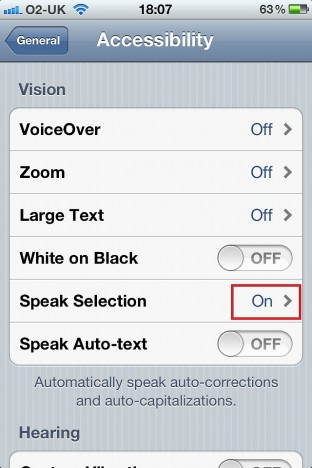
- Tap the Speak Selection option On/Off switch to turn it on. (disabled by default).
- Users also can adjust the rate of speech through a slider.
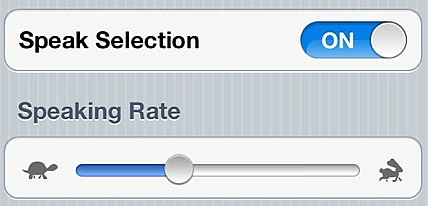
- Once users enabled Speak Selection feature, it will appear instantly on your iOS devices.
- Highlight a text and copy it, then tap the “Speak” button instead to let your iPhone, iPad or iPod Touch read the text. In addition, users also can stop it at any time by press “Pause” button.


Recent Articles
- How To Download HBO Shows On iPhone, iPad Through Apple TV App
- Windows 10 Insider Preview Build 19025 (20H1) for PC Official Available for Insiders in Fast Ring – Here’s What’s News, Fixes, and Enhancement Changelog
- Kaspersky Total Security 2020 Free Download With License Serial Key
- Steganos Privacy Suite 19 Free Download With Genuine License Key
- Zemana AntiMalware Premium Free Download For Limited Time
Tags
amazon
Android
apple
Apple iPad
Apple iPad mini
Apple iPhone
Apple iPhone 5
Apple iPod touch
Apple iTunes
Ashampoo Burning Studio
AVG Internet Security
BitDefender Internet Security
F-secure
Facebook Home
Free
Google Apps
Google Chrome
Google Maps
Instagram
iOS
iOS 7.1
iOS 8
iOS 9
ios 9.1
iOS 9.3
LG
Mac OS X
microsoft
Microsoft Office 365
Microsoft Office 2010
Microsoft Office 2013
Microsoft Office 2016
Microsoft Surface
Mozilla Firefox
Samsung
Skype
WhatsApp
Windows 7
Windows 8
Windows 8.1
Windows 10
Windows Vista
Windows XP
WordPress
YouTube