


Upload your photo direct from Sony Cyber-shot DSC-G3 via Wi-Fi
Sony unveiled the world’s first Wi-Fi digital camera with web browser – Sony Cyber-shot DSC-G3 lately. This new Cybershot G3 camera features built-in Wi-Fi and allows users to upload images and video instantly into websites, blogs, etc without having to transfer them into the computer.
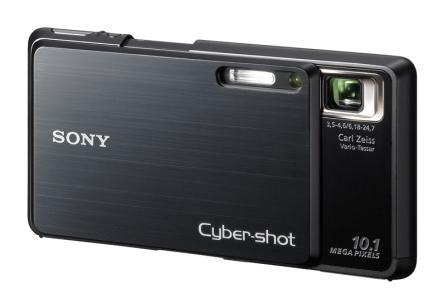
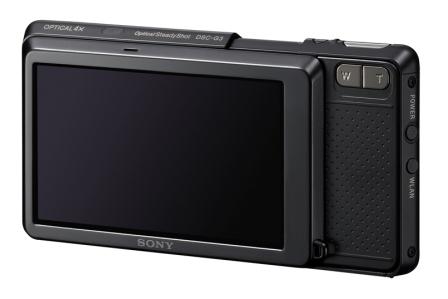
“Research shows that our customers greatly value sharing images and video clips, but they often forget or don’t have enough time if they wait to get home to upload images,” said Phil Lubell, director of digital camera marketing at Sony Electronics. “Our new Cyber-shot DSC-G3 camera provides the simplicity and convenience of sharing in the moment, while the impulse is still fresh in people’s minds.”
You can connect to the Internet via its embedded Web browser on the Cybershot G3 camera by pressing the WLAN button at any Wi-fi hotpots. The camera will automatically navigate to the Sony Easy Upload Homepage with Sony’s five image-sharing partners such as YouTube, Daily Motion, Picasa, Photobucket and Shutterfly. Besides these links, you are also able to access your own favorite sharing sites through the web browser. So, upload your photos and video chips and start sharing with your family and friends. You can also send an e-mail notification from sharing web sites to inform them of your newly posted pictures and videos.
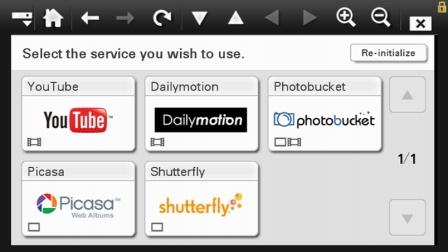
The new Sony DSC-G3 model comes with complimentary AT&T Wi-Fi access to Sony’s Easy Upload Home Page until Jan. 31, 2012. The Sony DSC-G3 includes Wi-Fi access at thousands of AT&T hotspots across the United States, including participating Starbucks coffee shops, selected book stores and major quick-serve restaurant locations, as well as hundreds of upscale hotels and airports.
The Sony G3 comes with 4GB internal memory that can store nearly 1,000 full-resolution or 40,000 VGA-quality photos. In order to make it easy to sort thousands of images, all images are organized automatically in albums by date. All the images can be displayed simultaneously as thumbnails on the screen for easy selection. The 3.5-inch wide Xtra Fine LCD touch screen can produce high resolution images (921,600 dots) which are approximately 4 times higher than normal LCD screen. It is perfect for photo viewing. With these features, you can carry the Cyber-shot G3 as your “pocket photo album” anywhere and any time to share photos and videos with your loved ones. Besides the 4GB internal built-in memory, the camera memory can be increased by an optional Memory Stick media card.
Other features of Sony Cyber-shot DSC-G3 include:-
- 10.1 Megapixel Super HADTM CCD Image Sencor
- Carl Zeiss® Vario-Tessar® 4x Optical Zoom Lens
- BIONZ™ imaging processor
- Ultra-slim design with 5/8″ (16.4mm) thin
- Face Detection technology
- Smile Shutter™ technology
- Double Anti-blur Solution
- Optical SteadyShot™ image stabilization
- Red-eye Correction
- Convenient photo modes
- MPEG Movie VX Fine Mode
- Semi-manual focus
- Stamina® Battery Power
- HDTV Compatibility
- Easy Shooting Mode
- PhotoTV HD
- PHOTOMUSIC feature
- Picture Motion Browser (PMB) ver. 3.2
- High Sensitivity ISO 3200
- Anti-blink Function
- Intelligent Scene Recognition
- 9-Point Auto Focus
- Burst Mode
- Wide Zoom display
- Password Lock
- 16:9 High Resolution Mode
- Multi-Resizing function


Recent Articles
- How To Download HBO Shows On iPhone, iPad Through Apple TV App
- Windows 10 Insider Preview Build 19025 (20H1) for PC Official Available for Insiders in Fast Ring – Here’s What’s News, Fixes, and Enhancement Changelog
- Kaspersky Total Security 2020 Free Download With License Serial Key
- Steganos Privacy Suite 19 Free Download With Genuine License Key
- Zemana AntiMalware Premium Free Download For Limited Time