


How to Personalise Facebook User Profile URL
Facebook has lately made a breakthrough by allowing members to customize and personalize the web address leading to their own profile. Similar to MySpace and Twitter, Facebook fans can customize their Facebook profile URL by adding their preferred name. For illustration, users Facebook profile URL may look like the following previoulsy:
http://www.facebook.com/profile.php?id=012345678.
With this new change from Facebook, users now can personalize the URL to become http://www.facebook.com/”yourname”.
How to customize your preferred profile URL? If you’re a current Facebook user, check out the section on top of your page after signing in. Facebook will offer some relevant suggestions based on your name. Select one or you can make your own but subject to availability. Select “Check availability” to check for available usernames. If the desired username is available, click “Confirm” in order to confirm your choice.
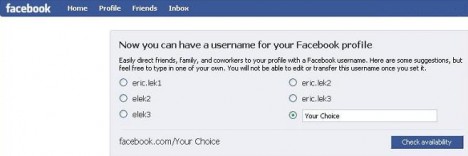
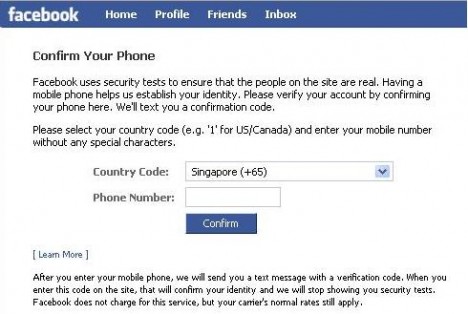
If you’re a new user of Facebook, Facebook will not immediately let you register your own username. However, you still can register by going through Facebook’s security tests to ensure that you’re real user. First, go to www.facebook.com/username and press the ‘verify via mobile phone’. You will be requested to key in your mobile phone number to obtain a confirmation code from Facebook via SMS message. Once you get the code, key it into the box provided for verification. Then, Facebook will let you choose your username by giving you some suggestions or let you propose your own. Click “Check availability” and follow by “Confirm” to validate your choice. If your username is not available, please select an alternative.
Important notes for username selection:
- The username must be at least 5 characters long which contain alphanumeric characters (A-Z, 0-9) or a period (“.”).
- Once selected and confirmed, you can’t change or transfer the username.
- Choose a username that is close to your name so that it is easy for people to remember.
- The username needs not necessary be your real name.
- Choose only one username for each personal profile.
- Don’t choose a username that infringes on other people’s property rights.
After selecting, share your new URL with your friends to make it easy for them to find and connect with you. With this short and targeted user name, people will also find it easy to locate you via Google search engine.


Recent Articles
- How To Download HBO Shows On iPhone, iPad Through Apple TV App
- Windows 10 Insider Preview Build 19025 (20H1) for PC Official Available for Insiders in Fast Ring – Here’s What’s News, Fixes, and Enhancement Changelog
- Kaspersky Total Security 2020 Free Download With License Serial Key
- Steganos Privacy Suite 19 Free Download With Genuine License Key
- Zemana AntiMalware Premium Free Download For Limited Time