


Windows Vista Tablet PC Free Programs – Sticky Notes, Windows Journal and InkBall
Windows Vista has Tablet PC features support that similar to Windows XP Tablet PC Edition 2005. With Tablet PC Optional Components installed in Windows Vista, there is a few additional new enhancements to help you make the most of pen-based computing on your Tablet PC. However, these tools, utilities and games can also be used on desktop and notebook computer without doubt, and some people may find them more than useful.
Sticky Notes
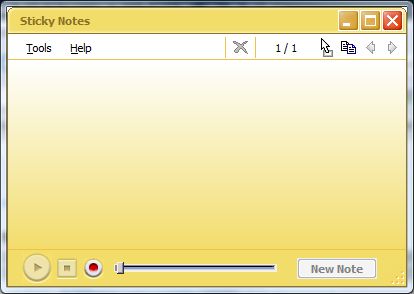
Sticky Notes is a useful note writing accessory (think it as electronic Post-it note) to write and store short notes, phone numbers, and other reminders. The yellow Sticky Notes can be placed on desktop as quick reminders or in any OLE-enabled program, such as Word, to add electronic comments or reminders to your documents. Sticky Notes can also record voice notes.
Windows Journal
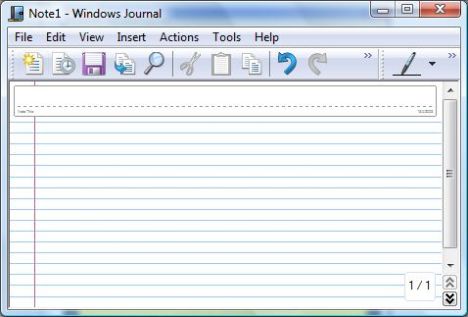
Windows Journal is a basic note-taking accessory that was created specifically for the Tablet PC. Windows Journal can be used just like a notebook to capture handwritten notes and drawings, type text, convert handwritten notes to text, import graphics files, and share notes with others. The journal files can be shared with non-Tablet PC users by exporting them as MHTML files, which others can view with Microsoft Internet Explorer version 5.0 or later, or by exporting them as TIFF images for viewing with a viewer that is installed by default on Microsoft Windows 98 or later.
InkBall

InkBall is actually a game, although it’s also considered as part of Tablet PC components. InkBall challenges and develops your tablet pen skills. The object of InkBall is to earn points by drawing ink strokes that guide colored balls into holes of the same color.


Recent Articles
- How To Download HBO Shows On iPhone, iPad Through Apple TV App
- Windows 10 Insider Preview Build 19025 (20H1) for PC Official Available for Insiders in Fast Ring – Here’s What’s News, Fixes, and Enhancement Changelog
- Kaspersky Total Security 2020 Free Download With License Serial Key
- Steganos Privacy Suite 19 Free Download With Genuine License Key
- Zemana AntiMalware Premium Free Download For Limited Time