
Windows Genuine Advantage (WGA) Validation Tool (KB892130) 1.7.69.2 Released Via Windows Update
Microsoft has pushed and rolled out the new version of Windows Genuine Advantage Validation Tool v1.7.69.2 since April 22, 2008 via Windows Update and Microsoft Download Center to those who wants to download non-critical and non-security related software. The current version 1.7.0069.2 of WGA Validation Tool was first released on March 18, 2008 to Windows Vista users, and on April 1, 2008 to Windows XP users who visit WGA website or Download Center, and perform validation test.
WGA Validation Tool (KB892130) allows users to perform validation test or check legality of Windows XP or Vista installed on their system when required, such as when users want to download WGA-restricted or genuine Windows and genuine Office only software programs from Microsoft Download Center. Depending on validation method which user chose, there may be different files been installed on their system.
Internet Explorer Used to Validate
LegitCheckControl.dll is installed in C:\Windows\System32 folder and Windows Genuine Advantage Validation Tool ActiveX Control is installed in C:\Windows\Downloaded Programs directory (Windows XP) or C:\Windows\Downloaded Program Files directory (Windows Vista).
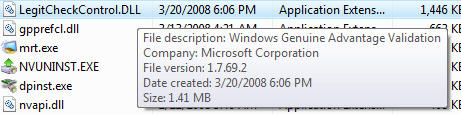
Both file version and modification data can be verified from the Properties.
Validation Done in Firefox
npLegitCheckPlugin.dll is installed in C:\Program Files\Mozilla Firefox\plugins folder.
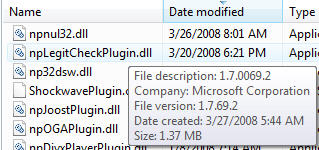
To view the file version and date of modification, check the Properties.
Opera, Safari and Other Web Browsers Used to Validate
Users require to click on Alternate Method to download legitcheck.hta file, which will then open a window to install and verify genuine status of Microsoft products.
Windows Genuine Advantage Validation Tool (KB892130) 1.7.69.2 also been updated to include targeting and handling of Windows XP Service Pack 3 users. Note WGA Validation Tool (WGAVT) is not the same with Windows Genuine Advantage Notification (WGAN), where the later is optical component that intends to remind users whether their Windows installed is counterfeit version, while WGAVT is mandatory and required before users using Windows Update and/or download WGA-protected applications from Microsoft Download Center. WGAN is also been updated metadata is this update, but binaries have not changed.
And, as expected, hacker has managed to this version 1.7.69.2 of WGA Validation Tool too.

Related Articles
- Install WGA and OGA Plugins for Firefox for In-Browser Validation
- IE7 Installation Did Not Complete or Fail in Windows XP SP3
- How to Uninstall and Remove Windows Genuine Advantage (WGA) Validation Plug-In for Firefox (npLegitCheckPlugin.dll)
- Fix Error Cannot Install WGA or OGA Plugin (WGAPluginInstall.exe and OGAPluginInstall.exe) in Firefox
- Fix Setup Installer Package Access Denied Failure Error Code 0×80070005 (Or 5 Or 0×5)
- How to Check Windows XP Product Activation Status
- Windows Vista 0×80070426 Activation Service Not Started or Validation Not Genuine Error
- Fix USB Issues in Windows Vista with KB941600 Cumulative Updates for USB Core Components
- Daylight Saving Time (DST) Time Zone Update (KB942763) Download Links
- Windows Update Cannot or Unable to Download and Install All Critical Updates


April 24th, 2008 22:44
[...] 1.7.69.2 (1.7.0069.2) on 18th March 2008 in Vista and 1st April 2008 in XP 1.7.69.1 (1.7.0069.1) on 21st March 2008 1.7.59.1 (1.7.0059.1) on 18th October 2007 1.7.59.0 (1.7.0059.0) on 7th October 2007 1.7.0036.0 (1.7.36.0) on May 2007 1.7.0018.7 (1.7.18.7) 1.7.0018.5 (1.7.18.5) on 21st March 2007 1.7.0018.1 (1.7.18.1) on 28th February 2007 (Download link - Improved setup, user interface and user assistance.) 1.7.0017.0 (1.7.17.0) on 16th February 2007 1.5.723.1 on December 2006 1.5.722.0 on 7th December 2006 (Download the LegitCheckControl.cab from here or go to validate Windows to install the ActivaX.) 1.5.716.0 on 31 October 2006 (previously released via Genuine Microsoft Software page, and click on Validate Now button. It’s possible that this version is released by other events such as when downloading from Microsoft. Only LegitCheckControl.dll is updated. Thanks to Sari.) 1.5.708.0 on September 2006 (distribute to whoever wants to download from Microsoft Download Center. Only LegitCheckControl.dll is updated.) 1.5.560.0 on 27th November 2006 (KB905474 Windows Genuine Advantage Notifications direct download link location - Enhanced features: Improved Setup with a new installation wizard that provides an overview of the tool, shows validation results immediately at the end of the installation process, and requires no reboot. Redesigned User Interface on system tray notifications to more visually appealing with clear links to full details of each message and further options for resolving any problems. Improved User Assistance with improved messaging for users who are unable to complete validation, along with links to more and better self-help tools.) 1.5.554.0 on September 2006 (direct download link URL) 1.5.540.0 on 28th June 2006 (direct download link URL) 1.5.532.2 on 6th June 2006 (direct download link URL) 1.5.532.0 on 30th May 2006 1.5.530.0 on 23rd May 2006 1.5.526.0 on 26th April 2006 [...]
April 30th, 2008 00:10
[...] Via [...]
May 3rd, 2008 11:13
[...] web browser that allows in-browser automatic genuine Windows or Office validation, similar to WGA Validation Tool for IE browser. When user attempts to download WGA genuine validation required application [...]
May 4th, 2008 09:58
[...] then the next possible reason that causes failing of IE7 installation process is, ironically, Windows Genuine Advantage Validation Tool (or KB892130). Some reports that if WGA Validation Tool is installed, the IE7 installation will fail. So for [...]
