


Use On-Screen Keyboard in Vista to Securely Enter Password
Security thread has been increasing violent and potent. Hackers are going all out to ‘steal’ sensitive and private information of Internet users with phishing websites. More aggressive and advanced hackers plant keylogger on users computer to log and track users’ keystrokes in order to capture the user name and password entered by users.
To avoid been falling victim to key-logger, a powerful anti-virus and anti-keylogger software is important. Other than using security protection software, computer users can use try to avoid typing on keyboard where keystrokes can be recorded by keylogger.
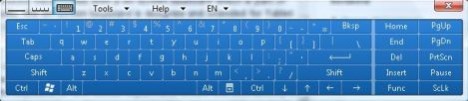
On-screen keyboard is such tool that allows users to enter text and characters by using virtual keyboard pressed with mouse click. Windows Vista comes with a handwriting recognition input panel with on-screen keyboard which is part of Tablet PC Optional Components. Originally, the on-screen keyboard is designed and intended for Tablet PC users when they don’t want to use ink, or just want to use the pen, or when using a Tablet PC without an attached keyboard.
But the on screen keyboard can serve as a workaround also to enter and type private information that users valued and definitely cannot be exposed. On-screen keyboard allows users to use mouse to click or a digital pen to tap the letters on the keyboard to form words. Input Panel enters the text directly in the field or at the insertion point of the active program. The on-screen keyboard is especially useful for entering small amounts of text, such as passwords and file names.
To use on-screen keyboard, make sure that you have installed and enabled Tablet PC Optional Components in Windows Vista, which is available to Home Premium, Business and Ultimate editions. After that, run Tablet PC Input Panel from Start Menu -> All Programs -> Accessories -> Tablet PC. Alternatively, type TabTip.exe in Start Search and hit Enter to run it. On the on-screen keyboard, click on third “keyboard” button to display the keyboard layout.


Recent Articles
- How To Download HBO Shows On iPhone, iPad Through Apple TV App
- Windows 10 Insider Preview Build 19025 (20H1) for PC Official Available for Insiders in Fast Ring – Here’s What’s News, Fixes, and Enhancement Changelog
- Kaspersky Total Security 2020 Free Download With License Serial Key
- Steganos Privacy Suite 19 Free Download With Genuine License Key
- Zemana AntiMalware Premium Free Download For Limited Time