


Upload Feature Inhibited Error When Adding Files or Images in ModX
When trying to upload files, images or photos using the built-in file uploading utility in ModX Manage Files page, tinyMCE or FCKeditor (FCK) Resource Browser, the following error message may appear and uploading fails.
Upload feature inhibited – make sure uploads are supported and the directory is writable for PHP.
or,
Failed to upload file, internal error.
To fix the cannot and unable to and and upload files and pictures to the web server via ModX manager administration user interface, ensure that the following directories on the web server have writable access for Apache HTTPD server, especially when Apache (and so do ModX script) is running as ‘nobody’ with group ‘nobody’, and the ModX directories are uploaded or created by different user.
- /assets/cache directory and all files inside it, except index.html
- /assets/export folder
- /assets/images folder
- /assets/files directory
Login to the server, and use CHMOD command to change the permissions of the above directories’ attributes to at least 0666 (rw-rw-rw-), which grants read-write access to owner, group and public. Sometimes, the directories have to be CHMOD set to 0777 (rwxrwxrwx) for the uploading to work properly.
Also possible cause that forbids files been uploaded is file_uploads directive of PHP is turned off, although this situation is unlikely to happen in web hosting server. To check the value of file_uploads PHP directive, go to Reports -> System Info, then in the “Server” section, click on View after the phpinfo(). Locate file_uploads directive under the Configuration – PHP Core section. It should shows On, else edit your PHP.INI to turn off the PHP file uploading support.
Sometimes, user may have simply upload to the wrong directory. As mentioned above, for security reason, only a few sub-directories inside the “assets” directory should be make writable to everybody, including Apache. When user using File Manager under Resources – Manage Files to upload, by default ModX will open root directory of ModX website, and attempt to upload to the root directory with no permission granted.
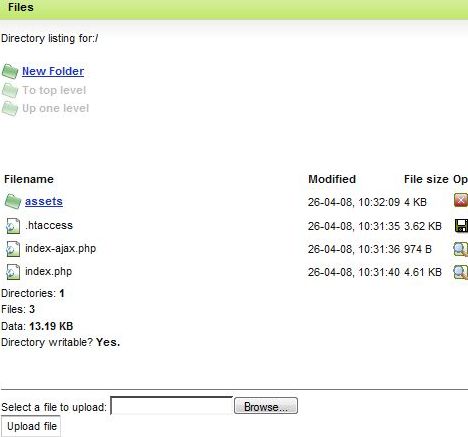
As can see from figure above, the directory listing is for “/”, which is top root directory. To access the correct directory, simply click on the assets directory, and then go to the sub-folder which you want to upload the file.
The same problem may happen using using TinyMCE or FCK editor to upload photos and images. The issue mainly arises from invalid path been set as the path to the assets folder. To correct and resolve the problem in future, go to Tools -> Configuration -> Interface & Features, and ensure that Resource URL is set as /home/nethler/public_html/assets/ and Resource Path as assets/. Another setting is at Tools -> Configuration -> File manager-> File Manager Path, which should be set as a directory which you want the File Manager to go into by default, instead of “/home/nethler/public_html/” which is set on installation by default. Note that all directory path has to be finished with slash (/).


Recent Articles
- How To Download HBO Shows On iPhone, iPad Through Apple TV App
- Windows 10 Insider Preview Build 19025 (20H1) for PC Official Available for Insiders in Fast Ring – Here’s What’s News, Fixes, and Enhancement Changelog
- Kaspersky Total Security 2020 Free Download With License Serial Key
- Steganos Privacy Suite 19 Free Download With Genuine License Key
- Zemana AntiMalware Premium Free Download For Limited Time