


Sending SMS Via Microsoft Outlook 2007 and SMSOfficer
Sending SMS or text messaging is a convenient and efficient way to deliver a brief text message to somebody’s mobile phone especially something that is difficult to tell through the phone. However, sending SMS texts with a small and tiny mobile phone is sometimes quite tiring. The little key pad and small screen display somehow make your eyes and fingers exhausted. Anyway, if you have updated or used Microsoft Outlook 2007, you can use the built-in text messaging features to type and send your SMS. The process is petty simple; type your new SMS message like the way you compose your new email; once it is done, just click send to deliver your SMS.
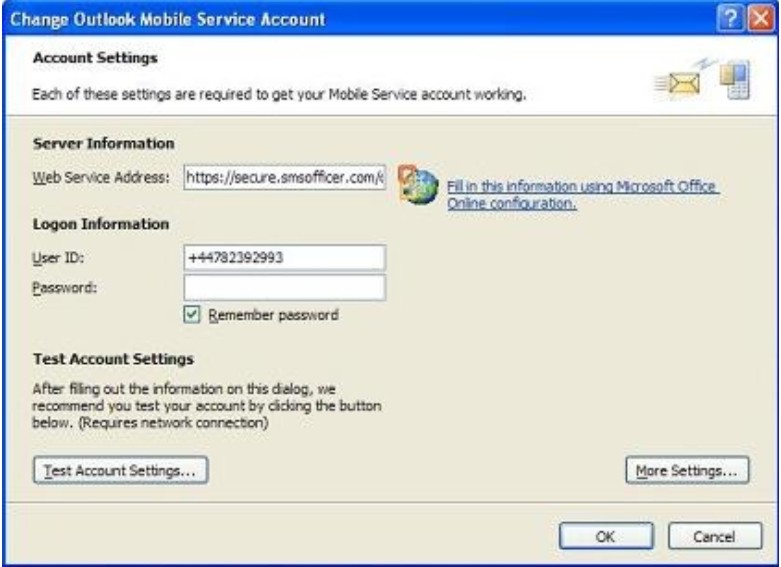
To work with Microsoft Outlook 2007 for text messaging, the first thing you need to do is sign up or register for an account with SMSOfficer. SMSOfficer allows users to send SMS to any mobile phone using the built-in Outlook 2007 option. This service from Microsoft supports almost all mobile operators in the world. Once you have signed up with SMSOfficer, you will be given a password. The password will be sent over to your mobile phone. You can use it to set up and configure your Outlook Mobile Service Account.
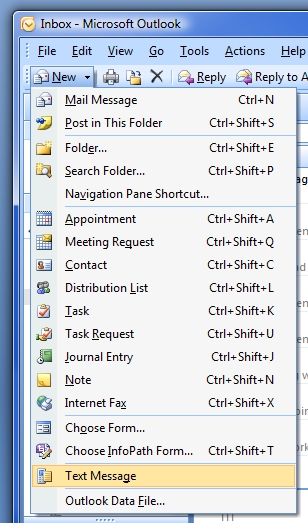
After configuring your Mobile Service account, you can compose your SMS message in Outlook. Just select New/Text Message and you can start typing your messages. Anyway, bear in mind, SMSOfficer allows you to send only a maximum of 160 characters for each SMS. If your message exceeds the 160 character limit, the extra characters are truncated and delivered as a separate text message.
New users will be given 10 free credits at the time they join the SMSOfficer service. Each credit is allowed for one SMS text message (160 characters). After utilizing the 10 free credits, users need to pay for additional credits. Users can make the payment via PayPal. Users who are using the SMSOfficer service will not be charged by the mobile operator for all the text messages send via SMSOfficer.
SMSOfficer has undoubtedly given convenience to users. Users can just forward important emails, memo, etc to the recipients. It speeds up the office communication process substantially. However having checked the price package offered by SMSOfficer, the charges imposed are more expensive compared to the charges imposed by the local mobile operators in some countries. If you are sending an SMS to your friends in your country, it is cheaper to use the service provided by the local mobile operators. However, if you plan to send SMS to your friends overseas, sometimes it is cheaper to use SMSOfficer. Just check the rate before subscribing to it.


Recent Articles
- How To Download HBO Shows On iPhone, iPad Through Apple TV App
- Windows 10 Insider Preview Build 19025 (20H1) for PC Official Available for Insiders in Fast Ring – Here’s What’s News, Fixes, and Enhancement Changelog
- Kaspersky Total Security 2020 Free Download With License Serial Key
- Steganos Privacy Suite 19 Free Download With Genuine License Key
- Zemana AntiMalware Premium Free Download For Limited Time