


Internet Slow to Crawl and Frequently Cannot Connect or Hang After Installing AVG 8.0
After installing AVG Anti-Virus 8.0 or AVG Internet Security 8.0, the Internet network connection significantly slowdown. Browsing and surfing Internet web pages and websites using Internet Explorer (IE such as IE7) or Firefox web browser, the speed slow to a crawl. Intermittently (actually is frequently), web browser can’t even connect to websites or web servers, and loading of web pages fail.
Sometimes, the web page is loading, but only partially or incompletely, especially on external component such as CSS or ads, causing distorted layout. On worse case, the web browser will freeze and hang upon accessing and loading of web pages, and user have to terminate and end the program from Task Manager. And some may feels that AVG 8.0 degrade system performance and slow down the overall computer speed.
The slow or inaccessible Internet problem happens due to the new anti-exploit technology namely AVG Active Surf-Shield and Search-Shield, part of LinkScanner module that incoporated into the AVG Security Toolbar with Yahoo! Search. These technology has been acquired through the purchase of Exploit Prevention Labs in 2007 and has been added to AVG 8 series of products. The Safe Surfing, Safe Searching of LinkScanner plus Web Shield provides real-time proactive protection against zero day exploits, drive-by downloads, phishing sites, online scams and poisoned social engineering trick pages by scanning search results in Google, Yahoo! and other search engines, protecting users from malicious web pages, and scanning files during download or exchange over ICQ or MSN instant messaging to ensure they are safe and free of malicious content.
With such active protection against everything related to Internet activities, it’s hardly surprise that AVG 8.0 slows down the Internet web browsing and surfing. Thus, the resolution or workaround to the AVG conflict or interference with Internet is to try to disable LinkScanner and/or Web Shield services, and if not successfully fix the problem, uninstall (not install) or disable the Security Toolbar and its associated LinkScanner (LinkShield).
To disable Web Shield and/or Link Scanner (Safe Search and Safe Surf) memory resident shield component, open AVG Control Panel User Interface (AVGTay), and then select LinkScanner to uncheck Enable AVG Seach-Shield (need web browser restart) and Enable AVG Active Surf-Shield to disable all interception during web browsing. Or select Web Shield to uncheck the Enable Web Shield to disable checks on downloads. Click Save changes when done. Also disable the AVG SAfe Search plug-in in Firefox and add-on in IE browser too.

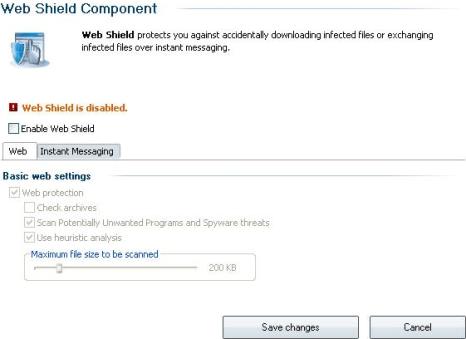
If disabling the Web Shield related services does not fix the issue, try to remove the LinkScanner module. It’s almost impossible to uninstall LinkScanner module or AVG Security Toolbar alone. So the workaround alternative is to uninstall AVG 8.0 program, and then reinstall AVG 8.0 with unwanted modules and AVG Security Toolbar not selected.
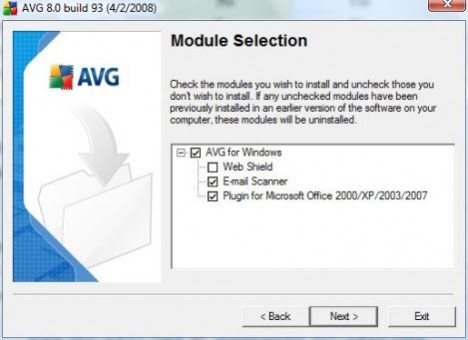
To not install the AVG Security Toolbar and LinkScanner during installation of AVG 8.0 AntiVirus or AVG Internet Security 8.0, choose Custom Installation, and then uncheck the check box for option to install Web Shield (and Link Shield if any) in Module Selection dialog of the installation wizard. By unselecting Web Shield, Web Shield, Link Scanner and AVG Toolbar are not installed. If you choose not to deselect Web Shield, unselect the option of Yes, I would like to install AVG Security Toolbar when asked. But note that AVG Safe Search add-on or plugin, which primarily responsible for the slow Internet, is still installed into web browsers
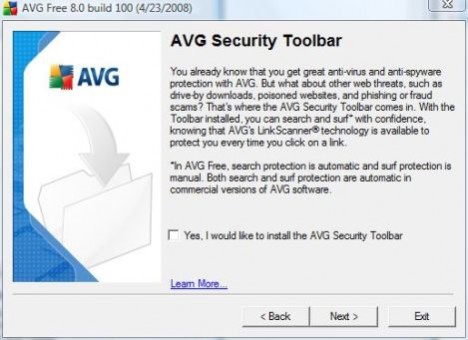
For AVG Free 8.0 edition, also choose to install via Custom Installation method. User will be asked whether to install AVG Security Toolbar during the installation process. Untick the checkbox of Yes, I would like to install AVG Security Toolbar.
If you’re using IE7 on Windows XP or Vista, slow Internet browsing may be caused by phishing filter too.


Recent Articles
- How To Download HBO Shows On iPhone, iPad Through Apple TV App
- Windows 10 Insider Preview Build 19025 (20H1) for PC Official Available for Insiders in Fast Ring – Here’s What’s News, Fixes, and Enhancement Changelog
- Kaspersky Total Security 2020 Free Download With License Serial Key
- Steganos Privacy Suite 19 Free Download With Genuine License Key
- Zemana AntiMalware Premium Free Download For Limited Time