


Install Windows XP SP3 Without Product Key and Use for 30 Days Free with Retail CD
Microsoft is making good their promise to remove mandatory product key input during the installation or upgrading process of Windows XP operating system, in a new Windows Product Activation (WPA) process that similar to what implements in Windows Vista. However, only integrated Windows XP with Service Pack retail install or OEM CD can bypass the step to enter product key. Windows XP SP3 installation or setup CD/DVD for corporate customers with volume licensing agreement still require a valid and legitimate volume license product key (VLK) to be entered, as tested and reported by Tip and Trick previously.
When installing Windows XP with Service Pack 3 integrated setup CD or DVD for retail or OEM channel (clean install from fresh state or upgrade), the installation process will still prompt for a 25-character product key as appeared on the yellow sticker on the back of Windows folder to be entered. However, user can leave the product key field blank, and simply click Next button to skip supplying a product key during installation. As similar to Windows Vista, installing Windows XP SP3 without a product key will have system offers the user 30-day activation grace period, and entitles user to a 30 days evaluation or trial period to try out the OS.
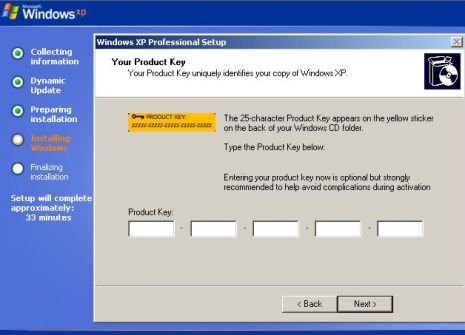
Windows XP Setup screen during entering product key phase, which now says “Entering your product key is optional but strongly recommended to help avoid complications during activation.”

If the user click on next without filling in the 25-character product key (leaving the product key field or the 5 boxes blank), an “Error” dialog saying “Entry of a product key will be required later for continued use of Windows. If you choose not to enter the product key now, you might need to reinstall Windows later and potentially lose files and information, or you might need to purchase another version of Windows. We strongly recommend that you enter your product key now. Do you want to enter your product key now?” It’s probably a scare tactic, just click “No” to skip and bypass the product key step.
It’s unclear why Microsoft decides to leave the Volume Licensing media (commonly known as VL or VOL) untouched, since it makes no difference to still require a product key during installation. The VOL editions of Windows XP is the main crack method used by pirates to counterfeit Windows XP OS. It’s commonly used with leaked or stolen VLK which once entered, Windows skips the activation procedure altogether, guarantee sure success to activate Windows XP (of course, the crack won’t work when validation comes into picture.) Thus, it’s believed that Microsoft probably fears of annoying the powerful big corporate customers who prefer fast and easy deployment as associated with Windows XP so far.

Menu item in Start Menu to activate Windows XP SP3

A activation key with days left for activation tooltip also displays in system tray (notification area).

Windows XP SP3 activation wizard will ask for product key to be entered before activation is done online.


Recent Articles
- How To Download HBO Shows On iPhone, iPad Through Apple TV App
- Windows 10 Insider Preview Build 19025 (20H1) for PC Official Available for Insiders in Fast Ring – Here’s What’s News, Fixes, and Enhancement Changelog
- Kaspersky Total Security 2020 Free Download With License Serial Key
- Steganos Privacy Suite 19 Free Download With Genuine License Key
- Zemana AntiMalware Premium Free Download For Limited Time