


IE7 Installation Did Not Complete or Fail in Windows XP SP3
After installing Windows XP SP3, which does not include upgrade to the Internet Explorer 7 web browser, so users who haven’t upgrade to IE7 will still have IE6 on the computer. However, when user download IE7 setup install and try to install the new version of Internet Explorer 7 for Windows XP SP3 on system running Windows XP SP3, the installation process may fail and user cannot install IE7 on Windows XP SP3 computer successfully.
At the error, IE 7 setup installer prompts “Internet Explorer installation did not complete”, and requires user to restart the computer to remove any change setup has made. After reboot, as expected, it’s stil IE6.0 intact.
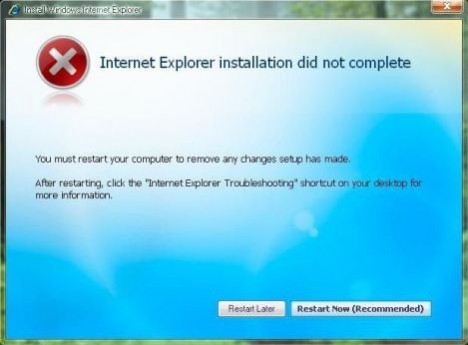
There is possibility that the IE7 setup installer downloadable from Microsoft Download Center does not support Service Pack 3, as it’s it’s labeled as for Windows XP SP2 only. However, some users have managed to install IE7 successful with IE7 for Windows XP SP3 build of setup package.
The resolution to the IE 7 cannot be installed on system running Windows XP SP3 is to ensure that you have downloaded the latest version of IE7 setup package. IE7 has two known released builds. One is build version 7.0.5730.11 released on end of 2006, while the newer one released on 2007 has build version 7.0.5730.13. Ensure that the setup installer for IE7 is for the later build version. In any case, this won’t be big problem if you just download the IE7 setup executable from Microsoft directly.
If the build version for the Internet Explorer 7 is correct and valid, then the next possible reason that causes failing of IE7 installation process is, ironically, Windows Genuine Advantage Validation Tool (or KB892130). Some reports that if WGA Validation Tool is installed, the IE7 installation will fail. So for those who intend to install IE7 after installing SP3, avoid WGA Validation Tool, or install IE7 first. For those who already installed WGA Validation Tool and fails to install IE7, reinstall Windows XP SP3 (or Windows XP SP1 or SP2 and upgrade to SP3) is the only alternative, as Microsoft doesn’t provide uninstallation option for KB892130.
Note: Microsoft has published IE7 for Windows XP SP3 through Windows Update. Try to download and install through WU to get your IE7.
But if you choose to reinstall, it’s best to upgrade to Internet Explorer 7 before installing Service Pack 3 to ensure that the upgrade is trouble-free. And this is so far the most recommended workaround to have IE7 on Windows XP SP3 for those who willing to fresh clean install Windows XP.


Recent Articles
- How To Download HBO Shows On iPhone, iPad Through Apple TV App
- Windows 10 Insider Preview Build 19025 (20H1) for PC Official Available for Insiders in Fast Ring – Here’s What’s News, Fixes, and Enhancement Changelog
- Kaspersky Total Security 2020 Free Download With License Serial Key
- Steganos Privacy Suite 19 Free Download With Genuine License Key
- Zemana AntiMalware Premium Free Download For Limited Time