


How to Track Viewers’ Stats on YouTube Video
YouTube users sometime might be wonder who were the viewers visiting their uploaded video or how these people can find the video. To assist users to track the amount as well as the source of these visitors, Google Analytics has added a tracking feature in YouTube which allow users to do the tracking. Use the following tip and trick to track viewers statistics.
Registered YouTube users can see a trend graph for video views and also see in which country those viewers are located, via a simplified version of Google’s Analytics package with this new built-in YouTube tracking feature. To track your own stats on YouTube video, just follow the following steps: –
1. Log into to your YouTube account
2. Click the Account link in the upper right hand corner

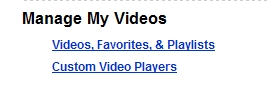
3. Click the Videos, Favorites, and Playlist link under Manage My Videos
4. When the screen listing your uploaded videos appears, click the About this Video button


Recent Articles
- How To Download HBO Shows On iPhone, iPad Through Apple TV App
- Windows 10 Insider Preview Build 19025 (20H1) for PC Official Available for Insiders in Fast Ring – Here’s What’s News, Fixes, and Enhancement Changelog
- Kaspersky Total Security 2020 Free Download With License Serial Key
- Steganos Privacy Suite 19 Free Download With Genuine License Key
- Zemana AntiMalware Premium Free Download For Limited Time