


How to Install and Use Windows Vista Ultimate Extras Sound Schemes (Pearl and Glass) in XP
Windows Vista Ultimate Extras gives away two free sound schemes for Windows Vista Ultimate customers who can download and install the sound packages from Windows Update. The sound scheme package of either Ultimate Extras Pearl or Ultimate Extras Glass, when enable, customize and change the sound and notification tune that Windows plays when user performs a task and an event happens in Windows and supported application programs.
The Windows Sound Schemes standalone update package downloadable from Windows Update server using the direct download links to the executable can be used to install the additional sound schemes to all Windows Vista editions, even though they’re not entitled to Ultimate Extras privilege. But what about Windows XP? You hear the sound from friend’s Vista computer or your another Vista computer, and love the sound, but you’re using Windows XP.
If you want to install Ultimate Extras Windows Sound Schemes consisting of both Pearl and Glass, use the following trick to download and install the sound schemes into Windows XP computer. The hack works on Windows XP Home and Professional edition, and regardless of service pack installed.
Firstly, download the Windows Sound Scheme standalone setup installer from Windows Update using direct download link for the sound schemes. Then use WinRAR to extract the content of the Windows Sound Schemes setup installer to a folder.
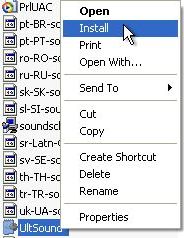
Download the following patched UltSound.inf (inside UltSound.zip). Use the patched UltSound.inf to replace and overwrite the original UltSound.inf in the extracted folder.
Finally, right click on the patched UltSound.inf, which is now supposedly in the folder together with other unpacked Windows Sound Schemes files, and click on Install. The Copying Files dialog with progress bar will be displayed to indicate installation process. Once the dialog disappear, installation is done.
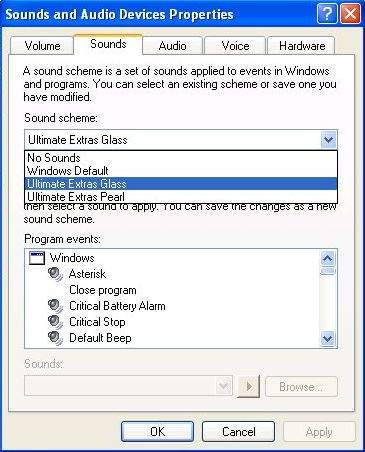
Now to go Control Panel -> Sound, Speech and Audio Devices, and then click on Change the sound scheme link to open Sound and Audio Devices Properties. From the Sound Schemes drop down list, select either Ultimate Extras Glass or Ultimate Extras Pearl to apply the new customized sound schemes to Windows XP PC.


Recent Articles
- How To Download HBO Shows On iPhone, iPad Through Apple TV App
- Windows 10 Insider Preview Build 19025 (20H1) for PC Official Available for Insiders in Fast Ring – Here’s What’s News, Fixes, and Enhancement Changelog
- Kaspersky Total Security 2020 Free Download With License Serial Key
- Steganos Privacy Suite 19 Free Download With Genuine License Key
- Zemana AntiMalware Premium Free Download For Limited Time