


How to Install and Enable Tablet PC Optional Components in Windows Vista
Windows Vista has built-in Tablet PC support which turns computer to fully functional, practical and comfortable tablet PC when users are on the move. Tablet PC components in Windows Vista include integrated pen support, touch-screen support, digital-ink input, snipping tool, handwriting recognition technologies, and innovative hardware.
Windows Vista Home Premium, Windows Vista Business, and Windows Vista Ultimate editions include Tablet PC features. In most cases, Tablet PC Optional Components should be installed and enabled by default. However, if you can’t find any Tablet PC related programs and functions, here’s how to install and enable or turn on the Tablet PC support in Windows vista.
- Click on Windows Vista Start button, and go to Control Panel.
- Click on Programs link.
- Click on Turn Windows features on or off link. If User Account Control requests for elevation confirmation, click on Continue button.

- Scroll down the list of features in Windows Features dialog window, tick the check box for Tablet-PC Optional Components.
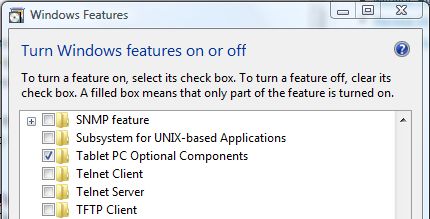
- Click OK to start installation of Tablet PC Optional Components in Vista.
Voila, once installation finished, all Tablet PC features now available in Windows Vista, even if it’s a desktop or notebook computer.


Recent Articles
- How To Download HBO Shows On iPhone, iPad Through Apple TV App
- Windows 10 Insider Preview Build 19025 (20H1) for PC Official Available for Insiders in Fast Ring – Here’s What’s News, Fixes, and Enhancement Changelog
- Kaspersky Total Security 2020 Free Download With License Serial Key
- Steganos Privacy Suite 19 Free Download With Genuine License Key
- Zemana AntiMalware Premium Free Download For Limited Time