


How to Disable Windows Vista CD or DVD Drive Auto Eject or Open Feature
When click on CD writer or DVD writer drive icon or letter in Windows Vista, the optical drive disc tray will automatically eject or open, for users to put in a CD or DVD disc. The CD or DVD drive will also auto eject when users sending files to the CD/DVD writer to burn to disc. When the optical drive is auto ejected or opened, the following dialog appear, asking users to insert a disc into drive.
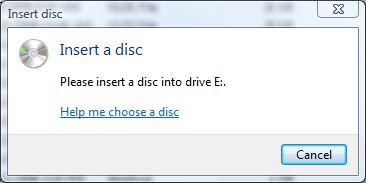
If you read the secret on Windows Vista CD/DVD optical drive auto eject or open feature, you will notice that the auto eject or auto open feature only works on CD or DVD writer, i.e CD-RW or DVD-RW optical drive, and when no disc has been inserted. Looks like it’s a convenient feature for quickly open the disk tray for users to put a blank disc so that the disc burning or writing process can start instantly.
Whatever the purpose, it’s not a feature that everybody needs or wants, and sometimes may get annoying. However, Microsoft does not provide an easy way to disable and turn off the auto eject and auto open of DVD/CD writer drive when clicked feature. However, based on observation that the disc tray will automatically open and pop out only when it’s a CD or DVD burner, then there is a workaround to disable the Vista CD and DVD drive auto eject feature.
The workaround to turn off Windows Vista CD or DVD drive auto eject function is to disable built-in CD/DVD burning feature in Windows Vista. Once the built-in CD/DVD burning function is turned off, Windows Vista will assume the CD/DVD burner/writer has only CD-ROM or DVD-ROM features, and thus will not open the CD/DVD drive tray automatically.
To disable Windows Vista built-in CD burning function, download the DisableEnableCDBurning.zip file, and run the DisableCDBurning.reg to merge its value to registry to disable the CD/DVD burning feature in Vista. To revert and re-enable auto eject feature, execute the other file, EnableCDBurning.reg. More detailed description and ways to disable CD burning feature can be read here.
Remember that once built-in CD burning feature is disabled, users have to rely on third-party programs such as Nero, Roxio and Alcohol 120% for burning/writing engine, which most users may be using anyway.


Recent Articles
- How To Download HBO Shows On iPhone, iPad Through Apple TV App
- Windows 10 Insider Preview Build 19025 (20H1) for PC Official Available for Insiders in Fast Ring – Here’s What’s News, Fixes, and Enhancement Changelog
- Kaspersky Total Security 2020 Free Download With License Serial Key
- Steganos Privacy Suite 19 Free Download With Genuine License Key
- Zemana AntiMalware Premium Free Download For Limited Time