


Hack to Add Second Hand to Product (RED) Clock Face Sidebar Gadget
Windows Vista Ultimate (PRODUCT) RED signature edition offers a bonus Windows Sidebar gadget – Clock in (RED), which has since been uploaded for free download via Internet. However, the clockr.gadget does not has a ‘second’ moving hand, the pointer that jumps every second to reflect the current time accurate to second.
For users who love to see a second hand on the clock face, use the following hack to add the second hand to the PRODUCT (RED) clock gadget in sidebar.
- Download and install PRODUCT(RED) clockr.gadget clock Sidebar gadget.
- Open Windows Explorer, and then copy and paste the following path to the address bar:
%UserProfile%\AppData\Local\Microsoft\Windows Sidebar\Gadgets\clockr.gadget\en-US\jsAlternative, navigate manually to x:\Users\[user name]\AppData\Local\Microsoft\Windows Sidebar\Gadgets\clockr.gadget\en-US\js folder, where X represents system drive, and [user name] is your logged on user account.
- Right click on settings.js, and then select Edit.
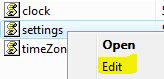
- Under the section of “function ClockSettings()”, locate the following line of code:
this.secondsEnabled = false;Modify the line to the following by changing “false” to “true”:
this.secondsEnabled = true; - Save the modified file.
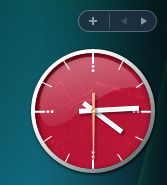
- Close the clock gadget, and then restart the gadget (re-add to Windows Sidebar) for the change to take effect. After activating again, the second hand will appear on clock face as shown in illustration.


Recent Articles
- How To Download HBO Shows On iPhone, iPad Through Apple TV App
- Windows 10 Insider Preview Build 19025 (20H1) for PC Official Available for Insiders in Fast Ring – Here’s What’s News, Fixes, and Enhancement Changelog
- Kaspersky Total Security 2020 Free Download With License Serial Key
- Steganos Privacy Suite 19 Free Download With Genuine License Key
- Zemana AntiMalware Premium Free Download For Limited Time