
Fix Virtual PC 2007 Shared Networking (NAT) Internet Not Working in Windows Server 2003, 2008 and Vista Guest OS

After installing Windows Server 2003, Windows Server 2008 and Windows Vista into Microsoft Virtual PC’s virtual machine (VM) (update to Virtual PC 2007 SP1) as guest operating system, and set the Networking Settings for the VM to use Shared Network (NAT) as the network adapter, the Internet appears to be not working where web browser (Internet Explorer, IE and Firefox) cannot connect, find, locate or browse to website.

However, when IP address is used, access to the external server on Internet may work. For example, ping, trace route, ftp, sftp, telnet and SSH using IP address instead of domain name or host name, user can successfully connecting to the remote server.

NAT (Network Address Translation) is an easy shared networking technique that masquerading or transceiving network traffic through a router that involves re-writing the source and/or destination IP addresses and the TCP/UDP port numbers of IP packets as they pass through. In the case of Virtual PC, it uses a virtual NAT router which built on host computer’s default active network connection to allow guest operating system to access Internet via the host’s Internet connection.

Shared Networking or NAT allows computers or hosts on a private network to access the Internet using a single IP address, without exposing the PCs (or virtual machines) to the external network, significantly reduce security risk. NAT is also useful to allow virtually unlimited number of IP addresses to connect to Internet, thus administrator is not limited by the amount of IANA assigned-IP address allocated space. Beside, Shared Network (NAT) allows user to easily plug and play or move the virtual machine or physical machine to different network configurations such as different Wi-Fi wireless access point, home or office network.

Most computers, including Virtual PC 2007 virtual machines can easily access Internet using Shared Networking, as easy as right after operating system is installed, which enable DHCP by default. So, the problem with Windows Server 2003, Server 2008 and Vista as guest OS cannot access Internet is by design. The Internet not working issue is caused by when the guest operating system queries for DNS Server from Shared Network (NAT) virtual router, the guest OS is configured to use the same DNS servers which are used by the physical host computer.

This is not the case with a Windows Server 2003 guest though. The problem is that Shared Networking configures the guest operating system to use the same DNS servers as are used by the physical computer. However, when actual DNS query resolving packets are been returned, it’s actually returned from the IP address of “192.168.131.254″, which is the virtual gateway used by Shared Networking (NAT).

Windows Server 2003, Windows Server 2008 and Windows Vista will reject any DNS resolution packets that are returned from a different source from than the DNS Server (both has different IP address) that it had requested the information from. As thus, all name resolution of domain name and URL fails, indirectly leads to the guest operating system appears to be cannot connect to Internet. Windows XP and older operating system is not affected by this behavior.

To fix the Shared Network (NAT) Internet no connection or not working issue, the resolution is to manually assign the IP address for the DNS Server for the guest operating system to 192.168.131.254, the virtual gateway IP address used by Virtual PC. To make the change (in guest operating system), open Network Connections folder (in Windows Vista, access via Network and Sharing Center), and right click Local Area Connection network icon to select its Properties. Then double click on Internet Protocl (TCP/IP) under General tab or Internet Protocol Version 4 (TCP/IPv4) under Networking (for Windows Vista) tab.
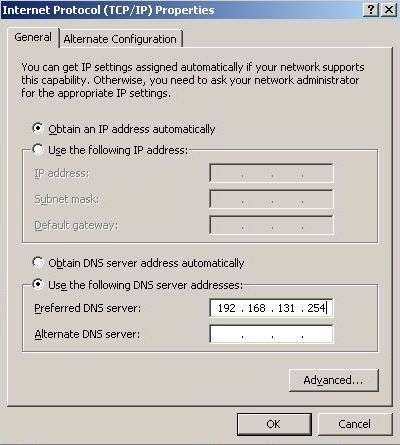
DNS Server Gateway IP for Virtual PC for Internet

Click to select the radio button of Use the following DNS server addresses, and then type in 192.168.131.254 into the IP address box for Preferred DNS Server. Click OK twice to exit, and voila, the Shared Network (NAT) now works as it should with Internet access.

If you’re encountering this problem in Windows XP guest OS, it’s probably caused by invalid DNS server assigned by Virtual PC network adapter too.



41 Responses to “Fix Virtual PC 2007 Shared Networking (NAT) Internet Not Working in Windows Server 2003, 2008 and Vista Guest OS”

Pages: [2] 1 » Show All

  1. Ali
    November 15th, 2009 05:19
    41

    Hi – thanks a lot – this tip saved many time. I tried so many things – on vista64(host) with vista32 guest system no internet was available. After i filled the dns there is internet connection (NAT). Thats funny because virtual pc 2007 is running fine on my other PC (vista32 host and xp or vista32 guest – i never had to do something to have internet connection in VPC)…Strange that !!!

  2. RyDer
    November 13th, 2009 04:44
    40

    Thanx a lot, man! You save my butt!!

  3. Chris
    November 10th, 2009 20:16
    39

    Thanks worked a treat!

  4. Vikas
    November 4th, 2009 13:55
    38

    “Use the following DNS server addresses, and then type in 192.168.131.254 into the IP address box for Preferred DNS Server.”

    Your one line solved my 2 days old problem. Simply great post… keep up the good work… :)

  5. Virtual PC 2007 如何上網
    September 30th, 2009 02:07
    37

    [...] 以下是參考至【Fix Virtual PC 2007 Shared Networking (NAT) Internet Not Working …】 [...]

  6. Rocjoe
    July 29th, 2009 08:56
    36

    Your awesome awesomeness is exemplified by this awesome article. It’s amazing how fixing the little things makes such a big difference!

  7. Caga Regras
    July 29th, 2009 07:19
    35

    Thanks! It seems other desktop virtualization apps suffer from the same problem when using W2K3 Server as a guest. Either VMware or VirtualBox, or both.

  8. Integrating Silverlight 3 in SharePoint 2007 « Karine Bosch’s Blog
    July 18th, 2009 06:20
    34

    [...] – If you are a developer, download Silverlight 3 Tools for Visual Studio and install. If you run  your environment in a Virtual PC (like most of the SharePoint developers do) you will encounter problems when you have no internet connection from within your Virtual PC. Until the beta version of Silverlight 3 you could use the trick to copy the content of the temporary folder while the exe was aching to install, and then install everything separately, but this time you will not find the Silverlight.3.x_Developer.exe file to enable Silverlight debugging in Visual Studio so you DO need an internet connection this time. (To enable internet access from within your VPC, I can recommend this post). [...]

  9. Tom
    June 19th, 2009 21:46
    33

    This is great. Thanks a lot.

  10. Naveed Sheikh
    June 5th, 2009 19:06
    32

    Thanks a lot for the article. The network is working for me now. I was pulling my hair since yesterday to rectify this problem.

  11. RJ
    May 14th, 2009 20:23
    31

    Thanks a lot .. it worked for me ..

  12. Edward
    May 12th, 2009 14:19
    30

    Perfect solution to my puzzling no-inet issue with Windows 7 RC1

    I now have a working Win7 RC using VPC on Vista. Very happy!

    Thank you so much

  13. giori
    May 7th, 2009 21:17
    29

    Thanks a lot for your article. I am running Wampp on my working pc and use virtual pc 2007 for testing ie6/ie7 display in web design.
    Was wondering why NAT was working with xp but not with Windows 7 until I found this. You really made my day!

  14. Martin
    April 29th, 2009 03:02
    28

    Agree as Windows 7 RC (build 7100)solution, thank you for this post

  15. msftnerd
    April 12th, 2009 11:48
    27

    Thanks for the info, you made my day…

  16. Michael
    April 2nd, 2009 21:20
    26

    Thanks a lot, I used this tip to configure my network setting on a virtual windows 7, works great!!
    =)

Pages: [2] 1 » Show All

Leave a Reply

You can use these tags: <a href="" title=""> <abbr title=""> <acronym title=""> <b> <blockquote cite=""> <cite> <code> <del datetime=""> <em> <i> <q cite=""> <strike> <strong>

Subscribe to comments feature has been disabled. To receive notification of latest comments posted, subscribe to Tip and Trick Comments RSS feed or register to receive new comments in daily email digest.
Custom Search

Incoming Search Terms for the Article

virtual pc nat - Virtual PC Shared Networking - virtual pc networking - virtual pc 2007 NAT - virtual pc 2007 internet - virtual pc internet - virtual PC 2007 networking - virtualpc nat - vpc networking - virtual pc 2007 no internet - virtual pc 2007 shared networking - nat virtual pc - virtual pc internet access - virtual pc no internet - networking virtual pc - virtual pc network not working - virtual pc 2007 network - virtual pc nat not working - shared networking virtual pc - shared networking (NAT) - shared networking nat - virtual pc shared NAT - virtual pc 2007 ip address - virtual pc networking not working - connecting virtual machine to internet - vpc NAT - Virtual PC 2007 Connect to internet - virtual pc shared networking nat - microsoft virtual pc shared NAT - virtual pc shared networking not working - virtual pc 2007 - shared networking - virtual pc 2007 shared network - virtual pc 2007 network connection - virtual PC 2007 NAT not working - shared networking nat virtual pc - virtual pc access internet - nat VPC - internet virtual pc - virtual PC shared network - Internet on Virtual pC - virtual pc 2007 network not working - all - virtual pc 2007 cannot connect to internet - virtual pc network - virtual pc internet vista - virtual pc dns - virtual pc internet not working - virtual pc 2007 shared nat - networking in virtual pc - Microsoft Virtual PC 2007 internet - virtual pc - virtual pc 2007 network NAT - 192.168.131.254 - virtual pc not working - internet virtual pc 2007 - how to connect internet in virtual pc 2007 - virtual pc shared networking vista - virtual PC 2007 IP - connecting virtual pc to internet - internet not working Microsoft VPC - virtual pc 2007 internet access - virtual pc connect to internet - virtual machine shared networking - virtual PC 2007 shared networking (nat) - how to access internet from virtual PC - virtual pc nat vista - how to connect virtual pc to internet - virtual pc cannot connect to internet - virtual pc 2007 network sharing - The virtual machine networking settings in Virtual PC 2007 - Virtual PC 2007 Vista Guest Internet - virtual PC network connection - virtual pc 2007 nat internet - server -