


Fix Third-Party Input Language Method Editor (IME) Issues in IE and Windows Vista by Disabling UIPI
Input method is a tool that indispensable when using computer and operating system, no matter which language is the OS. Even English language system depends on US keyboard to input text by keystrokes. As with Windows XP, Windows Vista comes with limited set of input method editors (IMEs) to allow users of Western keyboard to enter characters and symbols not found on keyboard, especially Chinese, Japanese, Korean and Indic characters.
However,the default IMEs in Windows Vista doesn’t fill the need of most users. A lot of CJKV (Chinese, Japanese, Korean and Vietnamese) East Asian language users depends on third-party IMEs such as Wubi (Wubizixing) input method, Thunisoft Pinyin input method and JJOL Pinyin input method. However, sometimes, these third-party IMEs cannot be used normally or do not working as expected in Windows Vista, especially when used to type in Internet Explorer (IE7) web browser.
The issue with input method in Windows Vista on IE is caused by IE Protected Mode, as when type in normal IE not in Protect Mode doesn’t trigger any problem to the input method. IE Protected Mode relies on UAC (User Account Control), UIPI (User Interface Privilege Isolation) and MIC (Mandatory Integrity Control), thus it’s safely assume that it’s security features of either UAC, UIPI or MIC that cause third party, especially older language input method to have problems.
When IE’s add-ons need to send Windows message or notification to an external process, it will be stopped. This security precaution is feature of UIPI, which intends to combat code injection exploits. UIPI leverages on Mandatory Integrity Control (MIC) to prevent processes with a lower “integrity level” (IL), such IE7 running in Protected Mode, from sending messages to higher IL processes (except for a very specific set of UI messages).
Thus the resolution to input method that has problem and issue with IE browser in Windows Vista is to modify the IME so that the external process can accept certain specified Windows message, or make sure of RPC and other security mechanism to facilitate communication between Internet Explorer process and process on higher “integrity level”.
But to end-users, such modification to IME is not possible. Thus, the only working workaround and solution is to turn off or disable UIPI to ensure the compatibility of the input method within the Windows Vista system. One major disadvantage of this workaround is that disable UIPI will drastically reduce security protection on system, and take a major slice of functions from IE Protected Mode. Although system will show that IE Protected Mode is still working, however its protective shield has been greatly weaken with UIPI turned off.
To disable or turn off UIPI (User Interface Privilege Isolation), run Registry Editor and navigate to the following registry key:
HKEY_LOCAL_MACHINE\SOFTWARE\Microsoft\Windows\CurrentVersion\Policies\System
Then, right click on the right pane to add a new “DWORD (32-bit) Value”, and set its value data to “0”.
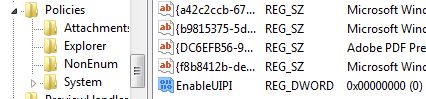
After setting the new registry value, restart the computer. And the issue of not compliant third party input methods on IE and Windows Vista will probably be solved.


Recent Articles
- How To Download HBO Shows On iPhone, iPad Through Apple TV App
- Windows 10 Insider Preview Build 19025 (20H1) for PC Official Available for Insiders in Fast Ring – Here’s What’s News, Fixes, and Enhancement Changelog
- Kaspersky Total Security 2020 Free Download With License Serial Key
- Steganos Privacy Suite 19 Free Download With Genuine License Key
- Zemana AntiMalware Premium Free Download For Limited Time