


Enable and Use Handwriting Recognition Input Method in Windows Vista
Windows Vista comes with a built-in handwriting recognition input method, as part of the Tablet PC Optional Components. The handwriting input recognition is actually a feature that ported over from Windows XP Tablet PC Edition. With handwriting recognition feature, users can write with hand, preferably on a physical writing pad or character pad with a pointing pen, and system will automatically convert the handwriting to typed text.
To start the writing pad or character pad for handwriting recognition in Windows Vista, go to Start Menu -> All Programs -> Accessories -> Tablet PC, and then select Tablet PC Input Panel. Alternatively, type Tablet PC Input Panel, or simply TabTip in Start Search, and select the program from the searched Programs list.
The writing pad and input panel will be displayed on screen. Sometimes the input panel may be hidden to the edge of screen, tab (or point depends on your setting) to open up the input panel with writing pad.


The best thing about the Windows Vista built-in Input Panel is that it supports almost every official languages that available by default in the Windows Vista operating system, for example, Simplified Chinese, Traditional Chiense, Japanese, Korean, Vietnamese, and English.
The user interface of Windows Vista’s Input Panel and Writing Pad is similar with Windows XP Tablet PC Edition 2005. However, Windows Vista’s versions has Aero transparency effect while in previous operating system, only shadow effect is enabled.
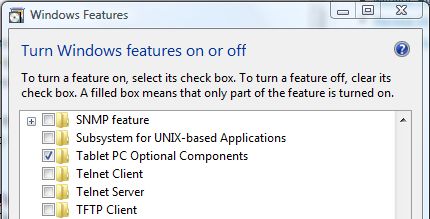
If you don’t manage to find “Tablet PC Input Panel” or “TabTip.exe” in “\Program Files\Common Files\Microsoft Shared\ink\” folder, install and enable the Tablet PC Optional Components in Windows Features, accessible via Control Panel -> Programs, and then click on Turn Windows features on or off.


Recent Articles
- How To Download HBO Shows On iPhone, iPad Through Apple TV App
- Windows 10 Insider Preview Build 19025 (20H1) for PC Official Available for Insiders in Fast Ring – Here’s What’s News, Fixes, and Enhancement Changelog
- Kaspersky Total Security 2020 Free Download With License Serial Key
- Steganos Privacy Suite 19 Free Download With Genuine License Key
- Zemana AntiMalware Premium Free Download For Limited Time