


Credit Card Cannot Be Used for PayPal Payment Error
When purchasing or buying products and services online, PayPal is one of the most commonly used payment gateway used by the e-commerce sites to allow customer to pay for the invoices. PayPal secure payment allows users to pay with their PayPal account balance or direct debit from bank account if registered, or by using credit card such as Visa, MasterCard, Discover, and American Express.
However, when users attempt to make a payment by using credit card without logging in to PayPal account, occasionally PayPal will reject, or doesn’t accept the credit card users desired to use with the following error message:
The credit card you entered cannot be used for this payment. Please enter a different credit card number.
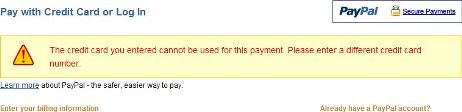
The issue is little tricky because the rejection may happen with credit card which previously accepted and worked properly, then suddenly stopped working, or worse, payment will not be accepted even if user changes or switches to any other credit cards.
There are many possible causes that can result in such credit card rejected error, and PayPal doesn’t give specific explanation on how to resolve the problem and make the payment goes through processing again, with the same or different credit card. Here’s some explanations and possible resolutions that suggested by users on Internet.
Credit Card Is Linked or Associated with a PayPal Account
Many believes the credit card is not accepted by PayPal when using it not signing into PayPal account is that the credit card is already been used in a PayPal account. If you’re using a credit card that’s linked or assigned to a PayPal account, try login to PayPal during payment process. You can change the source of fund to make the payment after logged in to use credit card instead of PayPal balance.
Credit Card Is Previously Used in PayPal Account or Assigned in Closed PayPal Account
PayPal remembers a credit card details even when it’s already been removed from the account. The information also been remembered even if PayPal account which linked to the credit card is closed and deleted. In this case, try another credit card, or assigned the credit card to a PayPal account, and pay with account logged in.
PayPal Limit on Non-Member Credit Card Usage
According to PayPal source, there is a limit based on the number of times, the amount of the transactions, the type of merchandise being sold that a credit card can be used within the system without having to verify ownership by opening an account. The restriction is for security and fraud protection reasons. There is no workaround to this limitation, but you should be able to use another credit card. If there is problem, try using another email address. Else, register an PayPal account.
Credit Card or Email Address Raises Flag in the Transaction
Closely link to reasons above, where some part of the transaction raises flag on the server that stop the payment. Two possible flags are on credit card or email address. Try changing either credit card or e-mail address or both when attempting to pay again.
Cookies Problem
Try using another web browser and/or delete cookies and attempt to pay with PayPal gateway using credit card again.
Credit Card Is Not Confirmed in Account
Contrary to some of the reasons above, if the credit card has been linked to an account, but not yet confirmed, try to complete all credit card information such as Card Verification Number or Security Code, and confirm the card by entering the PayPal code shown on the credit card statement on special refundable charge by PayPal.
In all case, the problem won’t arise if you add the credit card to PayPal account, and use it as funding source to pay the transaction through PayPal account.


Recent Articles
- How To Download HBO Shows On iPhone, iPad Through Apple TV App
- Windows 10 Insider Preview Build 19025 (20H1) for PC Official Available for Insiders in Fast Ring – Here’s What’s News, Fixes, and Enhancement Changelog
- Kaspersky Total Security 2020 Free Download With License Serial Key
- Steganos Privacy Suite 19 Free Download With Genuine License Key
- Zemana AntiMalware Premium Free Download For Limited Time