
64-bit (x64) Windows Vista SP1 (6001.1800) tcpip.sys Auto Patcher to Fix Event ID 4226 and Unlock Increase Maximum Connections Allowed
Since Windows XP SP2, Microsoft has placed a limit on the maximum concurrent half-open or incomplete outbound TCP/IP connection that Windows allowed to make at any one time (or per second). The security feature is inherited by Windows Vista in both 32-bit and 64-bit (x86 and x64) versions of the operating system, including Windows Vista SP1, severely restricts the networking capability and possibly download/upload speed especially using P2P client utility such as BitTorrent program such as BitComet, uTorrent and Azureus, or eDonkey network such as eMule.
The patched tcpip.sys for 64-bit (x64) Windows Vista breaks and unlocks the maximum TCP/IP concurrent incomplete half-open connection limit implemented in the OS by jumping pass the stop code. The patch raises the maximum TCP/IP connection attempts per second allowed to 65536 when original default limit (typically 25 in 32-bit Windows Vista) is hit. Theoretically, the patched tcpip.sys does not improve the download or upload speed by itself, but it can potentially and indirectly helps to increase D/U speed due to TCP/IP connections no longer been blocked and can be run as many as system needs without limitation.
The patched tcpip.sys can fix and resolve the following error symptoms:
- Windows Vista Event Viewer records the error of EventID 4226: TCP/IP has reached the security limit imposed on the number of concurrent TCP connect attempts, especially when downloading torrent files in full speed.
- Web browsing become very slow or intermittently stop loading.
- Web page cannot or unable to load and inaccessible, especially when running P2P or BT client.
- P2P program is slow in finding peers or sources, and connecting slowly.
- Slow downloding or download and upload not moving when using P2P programs.
- Video or audio streaming experiences slowdown when downloading heavy torrent or surfing net simultaneously.
Download the tcpip.sys Auto Patcher (for x64 Windows Vista SP1 with build version 6001.18000 only): x64VistaTCPIPAutoPatcher.exe
Windows Vista SP1 x64 tcpip.sys Auto Patcher Installation Guide
- Download and install ReadyDriver Plus 1.1 with default options during installation. ReadyDriver Plus will bypass signed drivers integrity checking enforcement rules on every system startup to ensure proper loading of Windows Vista.
You can always skip the usage of ReadyDriver Plus by pressing F8 during the very early initial stage of boot up process and select “Disable Driver Signature Enforcement” in Windows Vista Boot Manager menu. However, you must remember to do so every time, else Windows will fail to start. Easier method for user who don’t want to install ReadyDriver Plus is to use hibernation to hibernate computer without shutting down. But remember that only PC with 4 GB or less physical RAM memory can hibernate.
- Download the x64 tcpip.sys version 6.0.6001.1800 Auto Patcher (x64VistaTCPIPAutoPatcher.exe) with the ready-patched tcpip.sys.
- Run the x64VistaTCPIPAutoPatcher.exe setup installer. If UAC (see also how to disable UAC) dialog window prompts for permission to continue, enter administrator’s password or click on Continue button (if you’re logged on with an administrator user acocunt).
- Click on Yes when asked if you’re sure want to patch tcpip.sys for Windows Vista SP1 on “64-bit Vista SP1 TCP/IP Auto Patcher by TipandTrick.net” dialog box.
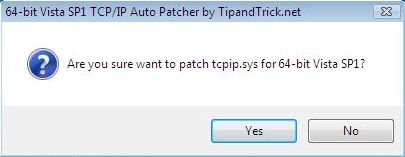
- The auto patcher will automatically take ownership and grant full access permission for administrators user group on tcpip.sys, make a backup of tcpip.sys as tcpip.sys.backup, and then copy and apply the patched and unlocked tcpip.sys, and then set the maximum number of concurrent half-open TCP connection attempts per second limit to 65536.
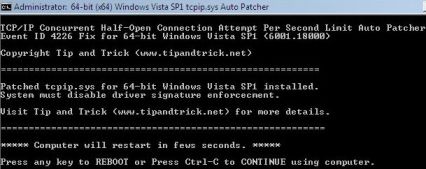
- After successful installation, restart the computer automatically by simply pressing any key. Else press Ctrl-C to terminate the batch command script and continue the desktop session.
Uninstallation and Removal of Patched tcpip.sys
The auto patcher automatically make a backup of unmodified original tcpip.sys build version 6001.18000 in the filename of tcpip.sys.original in %WinDir%\System32\drivers folder, where %WinDir% is normally C:\Windows directory, depending on whether you install Windows Vista. To uninstall and revert the patched tcpip.sys back to original version, simply delete the patched tcpip.sys and rename back the original from tcpip.sys.original to tcpip.sys.
Note that this TCP/IP module crack method no longer requires tcpip.sys to be signed with test digital certificate and configure BCD to load and boot Windows Vista in test signing mode. And if you’re not happy with 65536 counts of TCP connection limits you have, edit the registry to set your own preference value at the following registry key:
HKEY_LOCAL_MACHINE\SYSTEM\CurrentControlSet\Servic es\Tcpip\Parameters
Look to registry value named TcpNumConnections, and change the value data for it according it. To set the infinite value for maximum simultaneous half-open incomplete TCP connection attempts per second limit, change the value to 16777214 (in decimal).
Related Articles
- How to Suppress and Bypass System32 File System Redirect to SysWOW64 Folder with Sysnative
- Windows Vista Failed to Start with ntkrnlpa.exe or ntoskrnl.exe 0xc0000428 Error Status
- Windows Vista Starter Edition Supports More Than 1GB Memory (Tested on 2 GB System)
- Remove Password and Unlock Protected PDF Which Allowed To Be Printed Without Knowing Secret
- How to Disable Windows Vista CD or DVD Drive Auto Eject or Open Feature
- VMWare Server Causes System Frozen, Hang and Unresponsive When Power/Start Up in Vista
- O&O Defrag V4 Professional Edition Free License Key and Download
- How to Change MySQL FULLTEXT Index Minimum and Maximum Length of Words
- How to Enable PAE in x86 32-bit Windows Server 2003 and 2000 to Use Large 4GB or More RAM Memory
- Windows Vista Activation OEM Certificate (XrML .xrm-ms Digital License) Auto Installer


July 19th, 2009 00:31
I need to do this patch with XP. Can anyone send a link to where I can find the patch for XP? Thanks!
October 2nd, 2008 05:14
works great… Kaspersky, Symantec, eset, antivir, and mcaffee all detect this is clean.. HOWEVER BE WARNED… PGP desktop detects an outgoing encrypted SSL communication with the same IP addtress every 5 minutes… some DSL user at teksavvy.com. I have isolated this crack as the problem on 3 seperate pc’s (two of them virtual boxes).. UNinstalled crack and problem remained… reinstalled windows.. ran every virus, spyware, and rootkit scanner known to man with no luck. the only way to get rid of this is a clean format… its a shame people are such fucktards…
August 28th, 2008 09:33
[...] x64, getting the 4226 event so searched and found a couple of links (other than the above): 64-bit (x64) Windows Vista SP1 (6001.1800) tcpip.sys Auto Patcher to Fix Event ID 4226 and Unlock In… Windows Half-open limit fix (patch) – Home I know Vista has some driver signing etc and looking [...]
August 15th, 2008 21:04
I have used the tcpip.sys Auto Patcher and ReadyDriver Plus. But I can’t enter into “safe mode”. Could anyone please tell me how to enter safe mode ?
Best Regards
jusko
August 12th, 2008 01:59
Hi!
Is there any way to fix the event id 4226 in Windows Vista SP1 Ultimate x64, WITHOUT using ReadyDriver Plus, or any f8-pressing method?
June 19th, 2008 03:52
Sorry, is only one link:
http://www.mydigitallife.info/2008/02/17/download-vista-tcpipsys-and-uac-auto-patcher-to-increase-tcp-connection-limit/
On the picture you see version of tcpip. Follow the instruction and check your version and download proper patch tcpip.
Good luck!
June 19th, 2008 03:49
This patch is only for Vista x64 (64-bit) SP1 v.6001.18000 !!!
If you have Vista x86 (32-bit) Home Prenium you should read this:
http://www.mydigitallife.info/2007/04/09/windows-vista-tcpipsys-connection-limit-patch-for-event-id-4226/
Your Vista have SP1 or not?
You must check your build of system (or tcpip.sys) and choose the proper version patch. Look this:
http://www.mydigitallife.info/2008/02/17/download-vista-tcpipsys-and-uac-auto-patcher-to-increase-tcp-connection-limit/
June 19th, 2008 03:41
I am not sure what my build version is?
(6001 18000 or ?)
mikkimonkki
June 19th, 2008 03:37
Thank you
However, I am ignorant whether, i can use your patch?
Your guide explains, “Download the tcpip.sys Auto Patcher (for x64 Windows Vista SP1 with build version 6001.18000 only)”
My puter is a 32-bit operating system. Vista Home Premium.
Can I use the Autopatcher, with my system? I don
Thank you
mikkimonkki
June 19th, 2008 02:28
Autopatcher from this page is not working for me.
I using Vista Ultimate x64 SP1 build 6001.18000. If you are in the same situation you should read this:
http://forums.mydigitallife.info/showpost.php?p=26487&postcount=196
Metod from above article finally works!!!
))
Pozdrowienia z Polski panowie!!!
June 18th, 2008 03:43
Not working on my Vista Ultimate x64. In x86 everything it’s ok, but in x64 aufortunetlu not. I’m using o few metod:
1) Autopatcher + push F8 when Win start.
2) Autopatcher + ReadyDriver Plus.
3) Autopatcher + EasyBCD (and options: allow unsigned…)
Od course I have 6001.18000 tcpip version and I using Autopatcher from link above.
Everything I do on administrator account and my account (for test). No errors, no Blue Screen Of Dead, nothing, whatever I do.
In vista register (regedit) in TcpNumConnection I have 65536 and is not working whatever I do. I’m not installing any updates from MS exept SP1 (it was integrated by system).
Any idea? Please, help!
P.S. Sorry for my english
June 11th, 2008 23:59
Hi
I have purchased a HP Pavilion dv9500 Notebook. Vista Home Premium.
I`m apologize I am a newbie in puter things.
I need some advice please, in getting the correct “patch?” for P2P Azureus in correcting connections so they will no longer be blocked so I can download/upload faster.
Thank you so very much.
June 9th, 2008 17:53
Actually there are many cases when this does improve performance indirectly. No matter how low I set the limit in utorrent I was getting multiple errors in eventlog for reaching the hardcoded limit imposed.
As a result, browsing would be extremely slow and performance of bitorrent and other p2p would suck.
Finally a workaround for x64bit systems, waiting forever for this and it’s working great, not getting a single error.
June 5th, 2008 21:11
[...] half_open connections don’t have to be pimped and in fact can result in problems in the future: direct link to my comment __________________ Everything about the
May 21st, 2008 17:46
[...] in some cases, such as when patching the 64-bit tcpip.sys resides in %windir%System32, the original System32 directory has to be accessed and used in order [...]
May 19th, 2008 10:19
theone, tipandtrick is successor to mmydigitallife, read this:
http://www.tipandtrick.net/2008/welcome-to-tip-and-trick/
So there is no need to link to copycat site. And, this auto patcher should work within Windows desktop, no need to restart to recovery console mode to replace the tcpip.sys.
May 19th, 2008 08:00
@blah
A positiv effekt for p2p clients it’s only bullshit.
Lord Alderaan has the reason already written.
and this quote is not from Bill Gates. He has never said that, or similar.
May 19th, 2008 07:47
“640K ought to be enough for anybody.” – Bill Gates.
Silly M$ fanboy, Einsiedlerkrebs; don’t tell people what they can and cannot do. YOUR usage is exactly that.
May 19th, 2008 05:34
admin:
I found this removed by admin
a few days ago (see end for credits “Credit Goes to [ mydigitallife] | [ Yaronmaor]“.
May 19th, 2008 02:57
You don’t really need more halfopen connections.
In BitTorrent it won’t effect your download speed at all. It only would allow you to connect to a lot of peers faster. The effect of this on speed is virtually nil.
Patching for more connections gives more troubles then it is worth. For example people patch tcpip, then increase the max_halfopen in utorrent advance settings (or any other software). Then windows comes with an update that reverts the tcpip back to normal and suddenly they have all kinds of internet problems.
The only software I can think of right now that could actually use more halfopen connections is a Port Scanner. Oh! and of course virusses.
May 18th, 2008 18:47
without autopatcher? what you mean?
May 18th, 2008 18:17
I have tested it without the autopatcher and it works perfectly (with ReadyDriver Plus).
May 18th, 2008 06:54
Nobody need more than 25 half-open-connection per second.

