


Agnitum Outpost Firewall and Security Suite Free Genuine License Key Codes
Outpost Firewall Pro is a personal firewall security software developed by the Agnitum, a Russian company. Outpost Firewall Pro license costs $39.95 with 1 year of updates and support subscription, which can be renewed for $19.95 annually, although user can continue to use Outpost Firewall Pro forever for unlimited times with no restriction after license expires.
Continue reading »
Uninstall and Remove Vista Loader 2.1.3 (Activator 2008) Activation Crack
Hacker has managed to come out with a new-perfect yet easy to use for novice level of computer user crack to activate Windows Vista. The latest Windows Vista activation crack is Vista Loader 2.1.3, which emulate a BIOS with OEM public key and SLP marker to perform instant OEM style activation, and no longer has any abnormal string or text during boot loading screen.
Continue reading »
Design TipandTrick Fonts Online with FontStruct Font Builder
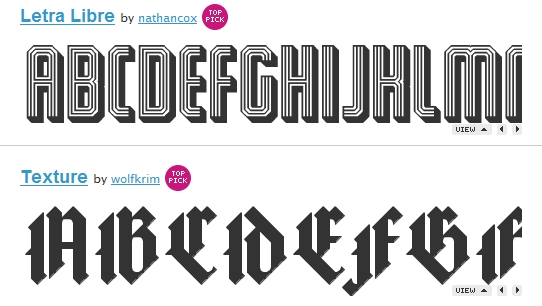
Probably you are sick of Times New Roman, Arial, Century, or other standards fonts available from your office suite program. Why not create a set of your own font which carries your personal identity to stamp your text messages or communicate in your personalized style? Well, you don’t have to go through a complicated process to generate your own font. Try out the new web-based font generator, FontStruct! FontStruct is a simple to use but powerful tool to assist you to create your personalized fonts. You don’t have to be a creative and innovative artist or to be very technically inclined; you can easily create your own font with your keyboard and mouse.
Continue reading »
Error 1721: There Is A Problem With This Windows Installer Package When Install or Uninstall on Vista
In Windows Vista, when attempting to install a program using setup executable file based on Windows Installer Package with .msi extension, a dialog box may pop up to display the “Error 1721” error message. The error may also happens when trying to uninstall a software program, and also when using msiexec.exe to call the installer.
Error 1721. There is a problem with this Windows Installer package. A program required for this install to complete could not be run. Contact your support or package vendor.
User Name and Password Access Denied or Failed When Running VMWare Server 2.0 in Windows Vista
The free virtualization software, VMWare Server 2.0 can be installed on Windows Vista as host operating system. After installing, user can double click on “VMWare Server Home Page” shortcut icon on desktop or in Start Menu to access VMWare Server Web Console user interface in a web browser. Users will then require to enter a Windows user name and password to login to VMWare Server web UI.
Continue reading »
Ways to Disable or Turn Off User Account (Access) Control (UAC) in Windows Vista
User Account Control (UAC), or unknowingly mistaken as User Access Control is new security feature in Windows Vista. The main display of UAC is the occasional pop up dialog box asking for user’s permission needed by Windows or for user to enter administrator’s password to perform the operation or run a program especially setup executable, installer or system tools. UAC also affects command prompt (Cmd.exe) with errors such as “The requested operation requires elevation” or “Access Denied” when not running in elevated command prompt with full privileges.
Continue reading »
iRex Launches New iLiad Book Edition
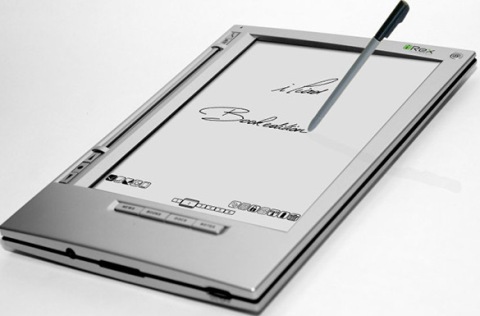
The Dutch pioneer in the development of electronic paper, iRex Technologies has announced the launch of the lower priced and simplified version of its successful iLiad E-book reader, named as iLiad Book Edition, featuring 8.1-inch (768 x 1024 pixels resolution; 160 DPI) electronic paper display allowing for close to 180° viewing angle, 64MB RAM, built-in stereo speakers, wacom-based touch input and 400MHz Xscale processor.
Restore Missing or Disappeared IE (Internet Explorer) Desktop Icon in Windows XP SP3
In Windows XP SP3 system, no matter it’s been upgraded from Windows XP with no service pack, SP1 or SP2 with XP SP3 standalone update package or Windows/Microsoft/Automatic Update, or user clean install from scratch with an integrated Windows XP with SP3 CD ISO image, the special desktop icon of Internet Explorer (IE) browser on desktop has gone missing. The IE desktop icon is different from normal IE shortcut, where IE desktop icon is special shell shortcut that provides quick access to Internet Options, and has shorter right click contextual menu.
Continue reading »


Recent Articles
- How To Download HBO Shows On iPhone, iPad Through Apple TV App
- Windows 10 Insider Preview Build 19025 (20H1) for PC Official Available for Insiders in Fast Ring – Here’s What’s News, Fixes, and Enhancement Changelog
- Kaspersky Total Security 2020 Free Download With License Serial Key
- Steganos Privacy Suite 19 Free Download With Genuine License Key
- Zemana AntiMalware Premium Free Download For Limited Time