


Hide and Lock Private Files Into Password Protected Lockbox
How to hide and keep your private info or data if you are using a shared PC with your colleague or your siblings? Well, you can try to lock and hide your sensitive stuffs in the shared PC with a free program called My Lockbox. Once you have locked your stuffs with this program, your sensitive stuffs will be protected from all parties including Administrator from viewing.
My Lockbox is a security application which was designed to assist users to protect any folder on their computer with password. Once users have set up the folder for their confidential data, My Lockbox will hide the protected folder (Lockbox) from any user and application of the system. Nobody can access to the lockbox either from the local computer or from the net. To retrieve the information, users need to use the program to locate the protected and hidden folder, key in a valid password then only they allowed to access to the files inside.
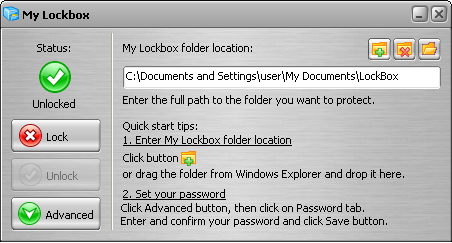
My Lockbox is a free application. Users can download it and try. It is easy to use. The Control Panel allows users to change basic lockbox parameters: lockbox location, protection status, password. Besides, the skinned user interface also allows users to choose from various skins for the most comfortable look and feel of the software.


Recent Articles
- How To Download HBO Shows On iPhone, iPad Through Apple TV App
- Windows 10 Insider Preview Build 19025 (20H1) for PC Official Available for Insiders in Fast Ring – Here’s What’s News, Fixes, and Enhancement Changelog
- Kaspersky Total Security 2020 Free Download With License Serial Key
- Steganos Privacy Suite 19 Free Download With Genuine License Key
- Zemana AntiMalware Premium Free Download For Limited Time