


Create a Dynamic Display Picture in Windows Live Messenger
Have you ever felt bored with your messenger display picture? Most of us probably use the messenger template picture or personal photos as the display. This is nothing unusual and not much fun. Why not give your pals a great surprise with a dynamic picture? With Window Live Messenger’s Dynamic Picture, you could create your own funny dynamic picture as easily as A-B-C.
Creating a dynamic display picture in Windows Live Messenger will make things more lively while chatting with your pals. The dynamic display picture is a picture that changes automatically when you send an emoticon to your pals during a conversation. It’s a great way to personalize the Windows Live Messenger window.
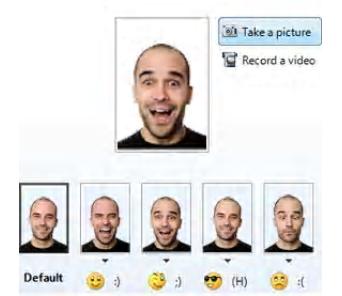
Just follow the steps below to create your personal dynamic display picture.
- Click on your Display Picture in Windows Live Messenger.
- Select Dynamic Picture button on the right side (Tips: you need connect your webcam to select the Dynamic Picture button).
- A window will be opened and adjust the webcam so that your face is fully in the photo frame.
- Select Record a Video or Take a Picture button. Your video or picture will appear in Default Window (Tips: If you don’t like the results, try it again. This is the picture people will see until you send an emoticon in a conversation).
- Click an empty frame above an emoticon and then follow by the Step 4 to assign the picture or video to the selected emoticon (Tips: you can change the emoticon associated with that picture by clicking the arrow under the frame).
- Select Done when you’re finished.
- Now you can start to have fun with your pals by using your own dynamic display picture.


Recent Articles
- How To Download HBO Shows On iPhone, iPad Through Apple TV App
- Windows 10 Insider Preview Build 19025 (20H1) for PC Official Available for Insiders in Fast Ring – Here’s What’s News, Fixes, and Enhancement Changelog
- Kaspersky Total Security 2020 Free Download With License Serial Key
- Steganos Privacy Suite 19 Free Download With Genuine License Key
- Zemana AntiMalware Premium Free Download For Limited Time