


Working on 2 Screens with Lindy USB to DVI Adapter
Lindy has launched a new USB to DVI adapter that allows you to connect an extra monitor to a PC or laptop by using the USB 2.0 port. The adapter can be used to extend or mirror your Windows desktop or even as the primary video output. This is very useful for the user who needs a bigger display for working such as a graphic designer, blogger, etc.
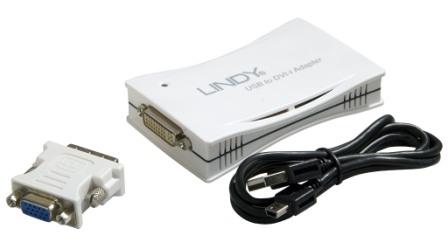
“From touching up photos on one screen and using tools and palettes on another, to viewing large spreadsheets across two monitors, the list of tasks you can achieve with two displays is endless,” says Andrew Ingram, Product Manager of LINDY Electronics. “It doesn’t matter whether you’re a graphic designer, a programmer or simply want to keep an eye on your twitter account, whilst surfing the web, not having to overlap programmes on a single screen is a real plus for computer users.”
The adapter’s DVI-I interface supports VGA resolution of up to 2048 x 1280 (16 Bit) or 1680 x 1050 (32 Bit) on DVI-D. It is compatible with Windows 2000, XP and Vista.
A maximum of six adapters can be connected to one PC provided that there are enough USB ports. No additional graphics card is required. Just install the supplied driver before using the adapter for the first time.
The benefits of using extra monitors:
- Open attachments on one screen while reading the email on another.
- View large spreadsheets simultaneously across two screens.
- Type documents on one screen while viewing reference material on another
- Multitask more effectively without overlapping windows
- Do multiple screen displays and presentations with one PC


Recent Articles
- How To Download HBO Shows On iPhone, iPad Through Apple TV App
- Windows 10 Insider Preview Build 19025 (20H1) for PC Official Available for Insiders in Fast Ring – Here’s What’s News, Fixes, and Enhancement Changelog
- Kaspersky Total Security 2020 Free Download With License Serial Key
- Steganos Privacy Suite 19 Free Download With Genuine License Key
- Zemana AntiMalware Premium Free Download For Limited Time