


Jabra Launches BT2080 Easy Series Bluetooth Headset with StatusDisplay LED
Jabra BT2080 Bluetooth headset is the latest addition to their “Easy Series” product line, its most intuitive headset to-date and featuring Jabra’s newest proprietary StatusDisplay LED indicators. As the product line Easy Series suggests, Jabra BT2080 Bluetooth headset is designed with easy to use controls and intuitively placed buttons – an answer/end button on the front of the headset and a dedicated on/off button in the back. Located at the side of the headset is the volume control for easy sound adjustment, no more fumbling during a call.
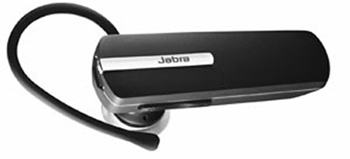
With Jabra’s state of the art StatusDisplay LED indicators, users can monitor their headset’s battery level and Bluetooth connection status with a simple glimpse of the multi coloured lights. Weighing less than 3 ounces, the BT2080 combines a sophisticated matte black finish with an attractive silver button to produce a contemporary and stylish headset. To ensure a more comfortable and molded ear fit, the BT2080 features a smaller and improved Jabra Eargel.
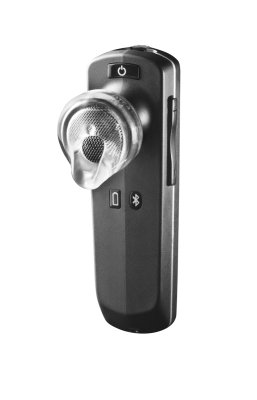 The BT2080 is also the first Jabra headset with Bluetooth™ 2.1 connectivity, enabling users with phones that support the technology to enjoy simple, secure pairing without the need to enter a PIN code. The Jabra BT2080 Bluetooth headset is affordably retailing at a price tag of $39.99 only.
Key Features Of Jabra BT2080
- Jabra StatusDisplay shows battery level and Bluetooth connection status
- Dedicated on/off switch makes it easy to turn on or off
- Bluetooth 2.1 for simple and secure pairing, no pin code required
- Improved Jabra Eargel, ensuring a comfortable, molded fit
- Dual wearing style: Over the ear with ear hook or in ear with Jabra Eargel™
- Auto-pairing to mobile phone
- EDR and eSCO technology for clear audio quality
- Up to 6 hours talk time and 8 days standby
- Dimensions = 50.8 x 15.8 x 8.9mm
- Weight = 2.8oz / 80g
- Voice dialing (phone dependent)
- Standard Micro USB charger


Recent Articles
- How To Download HBO Shows On iPhone, iPad Through Apple TV App
- Windows 10 Insider Preview Build 19025 (20H1) for PC Official Available for Insiders in Fast Ring – Here’s What’s News, Fixes, and Enhancement Changelog
- Kaspersky Total Security 2020 Free Download With License Serial Key
- Steganos Privacy Suite 19 Free Download With Genuine License Key
- Zemana AntiMalware Premium Free Download For Limited Time