


How to Tweak and Make Mozilla Firefox Load Faster
If you feel that your Firefox browser doesn’t load as fast as you think it should be, you probably should give UPX a try. In order to make your Firefox browser load faster, all you need is to cut down the loading time by compressing the DLLs and executables. Here’s how.

1. Go to this website at http://upx.sourceforge.net/#download and download the UPX file.
2. Extract the upx.exe into your Firefox installation folder which can be located at C:\Program Files\Mozilla Firefox.
3. Make sure Firefox is not running. Then shell to a command prompt in the Firefox installation directory.
4. Type in the following command in a single line and hit return:
for %v in (*.exe *.dll components\*.dll plugins\*.dll) do upx “C:\Program Files\Mozilla Firefox\%v”
5. In the event that you need to unpack the files in the future, just type in the command above but add the decompression switch “-d” after “do upx.”
That should do it. Try and let us know your results.

Alternatively, you can opt for the following adjustment or tweaking to the browser’s configuration. A word of caution, though. This is meant FOR EXPERTS ONLY.
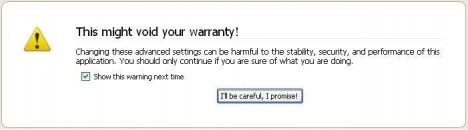
1. Type “about:config” into the address bar and hit return. A warning sign will appears. Click to continue if you’re really sure of what you are doing.
Scroll down and look for the following entries:
network.http.pipelining,
network.http.proxy.pipelining,
network.http.pipelining.maxrequests
2. Normally the browser will make one request to a web page at a time. When you enable pipelining it will make several at once, and this will speeds up the page loading.
3. Make amendments to the entries as follows.
4. Set “network.http.pipelining” to “TRUE” by double-clicking on it.
5. Set “network.http.proxy.pipelining” to “TRUE” by double-clicking on it.
6. Set “network.http.pipelining.maxrequests” to 8 by double-clicking it. This means it will make 8 requests at once. There is no point setting it higher than 8 as it is capped at 8 max. [The default value for this setting is 4]
7. Lastly right-click anywhere and select New-> Integer. Name it “nglayout.initialpaint.delay” and set its value to “0”. This value is the amount of time the browser waits before it acts on information it receives.
8. If you’re using a broadband connection you should be loading pages much faster now.
Note: Mozilla had recently launched their latest Firefox 3.1 Beta 3.


Recent Articles
- How To Download HBO Shows On iPhone, iPad Through Apple TV App
- Windows 10 Insider Preview Build 19025 (20H1) for PC Official Available for Insiders in Fast Ring – Here’s What’s News, Fixes, and Enhancement Changelog
- Kaspersky Total Security 2020 Free Download With License Serial Key
- Steganos Privacy Suite 19 Free Download With Genuine License Key
- Zemana AntiMalware Premium Free Download For Limited Time