


Hide News Updates of Casual Contacts in Facebook
It is well and good to keep in touch with friends via Facebook or other social networking sites, but being informed of their every move on the Net is rather trying on the soul. One does not need to know what prize a friend has just won in an online game, or which shopping website another friend has just visited. The news feed from Facebook can be rather annoying unless one is a stalker.
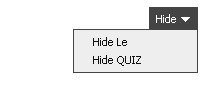
How can we silent the stream of news bombarding our senses every moment we’re online? Park the cursor to the right of a news feed item, and a Hide menu will appear. Click on that to hide all news generated from the particular game or quiz. Alternatively, you could hide all of a contact’s updates from your feed, especially if the person is not one your closest friends.


Recent Articles
- How To Download HBO Shows On iPhone, iPad Through Apple TV App
- Windows 10 Insider Preview Build 19025 (20H1) for PC Official Available for Insiders in Fast Ring – Here’s What’s News, Fixes, and Enhancement Changelog
- Kaspersky Total Security 2020 Free Download With License Serial Key
- Steganos Privacy Suite 19 Free Download With Genuine License Key
- Zemana AntiMalware Premium Free Download For Limited Time