


Gmail Introduces Search AutoComplete
One more round of applause to those software engineers back in the Gmail Labs for introducing yet another great feature – Search AutoComplete. I’m not sure about others, but having utilizing more than half of the 7300Mb of storage in my Gmail currently, searching for emails and attachments can be a real hassle. Thanks to Search Auto Complete, now you can find the right emails among thousands of messages in a jiffy.

Search AutoComplete is a new experimental feature in Gmail Labs designed to make search in Gmail easier. One of the most popular searches in Gmail is for names or email addresses, so the first kind of suggestions you’ll see are contacts. All you need to do is just type in a couple letters and select the desired contact from the drop down list. Quick and simple.
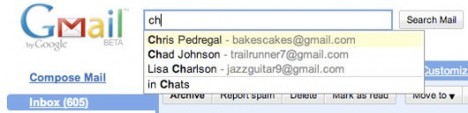
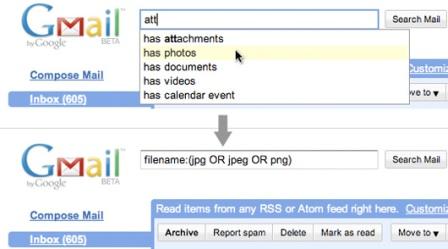
Gmail also offers a bunch of advanced search operators, which provide a powerful way to find messages. For example, I want to search for photos that were sent to me by Chris. Normally, I would have to enter Chris’ email address followed by filename:(jpg OR png) but with Search AutoComplete, I just need to type “photos” or “pictures”, then by using the down arrow key to select “has photos” from the drop down list and the search query (filename:(jpg OR png)) gets inserted for me automatically. If you type in the word “attachment”, Search Autocomplete will list the most common attachment types for you.
To turn on Search Autocomplete, just click on the Labs tab under Gmail Settings and select the “Enable” button.


Recent Articles
- How To Download HBO Shows On iPhone, iPad Through Apple TV App
- Windows 10 Insider Preview Build 19025 (20H1) for PC Official Available for Insiders in Fast Ring – Here’s What’s News, Fixes, and Enhancement Changelog
- Kaspersky Total Security 2020 Free Download With License Serial Key
- Steganos Privacy Suite 19 Free Download With Genuine License Key
- Zemana AntiMalware Premium Free Download For Limited Time