
What’s the Login User Name and Password for VMWare Server 2.0?

VMWare Server 2.0 (currently in Beta 2 release) has departed significantly from legacy VMWare Server 1.0. It’s still a free virtualization software to users to create, manage and run virtual machines, but instead of usual standalone desktop (or notebook laptop) based application, VMWare Server 2.0 now runs solely on web-based management user interface, plus many other new features, enhancements and improvements.

To log in to VMWare Server 2.0, users will have to access https://localhost:8333/ui/ or http://localhost:8222/ui/ for non-secure connection (the URL may takes the form of your computer name) with a web browser to come to VMware Infrastructure (VI) Web Access management interface, which is VMWare Server Console, normally simply call Web-UI. Don’t worry about your system doesn’t have a web server such as Apache or Microsoft IIS running, VMWare Server 2.0 install Tomcat web server in the background.

But users will come to a VI Credentials page asking for Login Name and Password, as shown in the screenshot below.
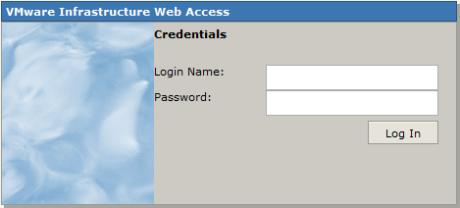
VMWare Server 2.0 Login Screen

What login user name and password to use? This probably your first installation of VMWare Server 2.0, and even if you have installed VMWare Server 1.0 before, it never ask for creation of any user account or its user ID or password during installation of whatever versions. And searching up and down in Start Menu’s VMWare Server program folder doesn’t reveal any program to create or manage user’s login name for VMWare console too.

Actually, VMWare Infrastructure Web Access, and hence VMWare Server 2.0, uses user account of the operating system, i.e Windows XP, Windows Vista, Windows Server 2003, Windows Server 2008 and Linux distro. So to login to VMWare Server 2.0 Web Console, logon with an administrative account’s user name of Windows or Linux (Administrator or root) and the corresponding password. Note the password is a must. In Windows, most built-in Administrator account does not have password by default even after been enabled, and so a password must be assigned.

It’s possible to create and add another user account with administrator’s privileges specially for VMWare Server login purpose.



42 Responses to “What’s the Login User Name and Password for VMWare Server 2.0?”

Pages: « 2 [1] Show All

  1. Google Money
    February 27th, 2009 12:07
    25

    Thanks for the great information. I will definitely be coming back.

  2. sancho c sebastine
    February 17th, 2009 19:31
    24

    I am having a windows machine and all this did not work for me. I created a new windows user with administrator privileges. And bingo it worked. Not sure why. But I guess might help someone

  3. Sn4kY
    February 17th, 2009 00:56
    23

    Ahhhhhh merci pour le login et le mot de passe pour se connecter à l’interface…c’est vachement bien documenté en plus sur le support de VMWare……

  4. kjaskajsijaksj
    February 16th, 2009 06:24
    22

    Pedasos de putos como cargo credito en mi cel.
    respondeme bien o te cojo… :-)

    Aaaaaaaah… m olvidaba, PUTOOOOOS

  5. irose123
    February 11th, 2009 07:57
    21

    Quick tip for Vista/Win 7 beta users:

    None of the above worked for me, not using built in Administrator account, not prefixing domain or workgroup onto user id, not starting all unstarted VM services, not using unsecured port 8222 instead of secured 8333, nothing.

    But when I added my renamed admin user to the __vmusers__ group (shouldn’t have been necessary I know!) and tried //MyMachineName:8306/ui instead, logged as as my renamed admin user with normal windows logon password, bingo! Just something to try if all else has failed.

    Hey VMWare, sort your documentation out, this is almost unforgivable!

  6. Josef
    January 26th, 2009 10:59
    20

    I am using OpenSuse 10.2 and could not login even after modifying authorization.xml. I had to change the contents of /etc/pam.d;/vmware-authd to

    auth include common-auth
    account include common-account

    Now I am able to login both as root and with my account.

  7. Greg Munger
    January 19th, 2009 00:31
    19

    Just to be clear, this worked with Ubuntu host (which cannot directly login to root).

    Replace root with your username on line 10 of: /etc/vmware/hostd/authorization.xml (ACEDataUser).”

    sudo /etc/init.d/vmware-mgmt restart

    This let me in.. thanks

  8. trickeries! » Blog Archive » To the makers of VMWare 2.0 for Linux: wtf, go to hell.
    January 16th, 2009 19:29
    18

    [...] for this thing, I don’t click because I no longer trust these fuckers. A few results down is “What’s the Login User Name and Password for VMWare Server 2.0 …”, I click [...]

  9. Ace619
    January 8th, 2009 05:19
    17

    To echo everyone else, thanks for documenting what for some reason VMware decided not to. An obvious solution not put anywhere obvious within the user’s guide or FAQs.

    For Vista users, if you want to use the built in administrator account, you must enable it and give it a password. Probably mentioned in the related article.

  10. Hector
    December 26th, 2008 01:22
    16

    Thanks, a lot, I was going nuts, trying to figure out, how to create a user name and password, it never cross my mind on using my windows credentials.

    Keep up the good work.:)

  11. blaze
    December 24th, 2008 00:18
    15

    thanks a lot!
    it amazes me how they haven’t mentioned it anywhere in UI or docs or readme or anywhere else.

  12. fahad
    December 18th, 2008 14:24
    14

    Thanks, I can login by using admintrator user name and it’s password.

  13. chandra
    December 16th, 2008 12:07
    13

    alexander

    thanks! your suggestion worked for me. But wanted to work this with my admin login.
    However i can continue my stuff now. Big thanks.

  14. Jc
    December 7th, 2008 00:04
    12

    Gracias por el aporte muyyyy bueno.. Lo andaba buscando.. sabes en donde puedo conseguir tutorias de ese programa? me parece muy interesante

  15. Frank Carver’s Punch Barrel / Are Thoughtworks’ products (and product sales) really so rubbish?
    November 29th, 2008 22:34
    11

    [...] with the sudden appearance of a login box which was never needed on the old vm manager, and required me to create a new Windows admin user!) but eventually I got to a stage where the new vm image would at least load into the [...]

  16. joczol
    November 17th, 2008 16:34
    10

    hola…
    Tengo un grande problema al iniciar el VMWare en el navegador de internet, no me da los campos para loguearme y entrara a la administracion del software, es decir, la pàgina queda totalemente en blanco y de ninguna manera aparecera el loguin. Esto me paso al poco tiempo de haber instalado el server y aun no he podido encontrar la solucion.

  17. Dwayneair
    October 23rd, 2008 02:26
    9

    I tried to change the authorization.xml from to my root login and it keeps replacing the root even though I am editing it from sudo gedit. Can someone show me what the .xml should look like, maybe I do not quit understand which “root”s to replace. I am kinda new to this as well.

    Thanks

  18. Courtney
    October 22nd, 2008 19:07
    8

    Thanks so much. I edited the authorization.xml file changing the “root” to my username and then did the restart mentioned by Alexander. Got right it.

  19. Alexander
    October 18th, 2008 00:12
    7

    Thanks Gerry, you pointed me in the right direction.
    To restart you need to run
    sudo /etc/init.d/vmware-mgmt restart

    which controls the webaccess service

  20. aristotlejones
    October 16th, 2008 04:23
    6

    Two words: Virtual Box

    Free, built by Sun, just works.

  21. frustrated
    October 13th, 2008 21:36
    5

    Its not a lot to ask to be warned of this before installation, even for a free product. newsflash vmware, not everyone HAS the ability to make user accounts on corporate machines. personally, i think this is a moronic “feature”

  22. Gerry
    September 13th, 2008 12:56
    4

    Okay, edited /etc/vmware/hostd/authorization.xml replacing the user root with a username with root access. Tried restarting vmware server, but no joy. Rebooted Ubuntu, then firefox http://127.0.0.1:8222 (their default) and any user can now login to vmware using the new username/passwd in their auth file.

  23. Gerry
    September 13th, 2008 12:11
    3

    Sounds good, but no joy here. Ubuntu 8.04.1, vmware server2. Created a new user, with root access, and in root group. Still, do not have permission to login to vmware web access. Used defaults on vmware server install.

  24. Robert
    September 3rd, 2008 22:39
    2

    Thanks for that it works well, pity VMware did not mention this when i first installed it.

  25. User Name and Password Access Denied or Failed When Running VMWare Server 2.0 in Windows Vista » Tip and Trick
    May 11th, 2008 15:33
    1

    [...] VMWare Server Web Console user interface in a web browser. Users will then require to enter a Windows user name and password to login to VMWare Server web UI. However, when attempting to login with a Windows Vista user account with administrative [...]

Pages: « 2 [1] Show All

Leave a Reply

You can use these tags: <a href="" title=""> <abbr title=""> <acronym title=""> <b> <blockquote cite=""> <cite> <code> <del datetime=""> <em> <i> <q cite=""> <strike> <strong>

Subscribe to comments feature has been disabled. To receive notification of latest comments posted, subscribe to Tip and Trick Comments RSS feed or register to receive new comments in daily email digest.
Custom Search

Incoming Search Terms for the Article

vmware server login - vmware server password - vmware server default password - vmware server 2 default password - vmware default password - vmware server 2.0 login - vmware server default login - vmware server 2 login - vmware server 2 default login - vmware server 2.0 default password - vmware server login password - VMware infrastructure web access password - vmware 2.0 login - vmware server username password - vmware server 2 password - vmware server username - vmware login - vmware server login name - vmware default login - vmware server 2.0 password - vmware 2.0 default password - VMWare server default user - vmware server username and password - vmware server default username password - vmware server default username - default VMware server password - VMware 2.0 password - vmware server web access password - vmware server 2 login name - vmware server user password - vmware 2.0 default login - vmware infrastructure web access login name - vmware server default username and password - VMware Infrastructure Web Access default password - vmware web access password - vmware server 2 login password - vmware infrastructure default password - vmware login name - vmware 2 login - vmware server 2.0 Login name - vmware server logon - VMware default username password - vmware server login name password - VMware Server 2.0 default login - vmware login password - vmware 2 default password - vmware server 2 default user - vmware username password - vmware server 2 username password - login vmware server - vmware server 2 default username - vmware server 2 default username password - vmware server web access login - vmware web access default password - vmware server 2 username - vmware server 2.0 username - vmware default username and password - vmware default username - login vmware - vmware 2.0 username password - vmware web access login name - vmware infrastructure web access login - default password for vmware server - default password vmware - VMware server login - vmware 2 default login - vmware server user name password - vmware server 2.0 username password - vmware username and password - vmware server web login - default vmware login - default password vmware server - vmware infrastructure default login - password vmware - vmware server 2.0 default username -