


Sony’s MicroVault Click and Click Excellence for Business Professionals
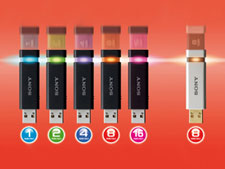 Electronic giant, Sony, has unveiled its colourful MicroVault Click and Click Excellence range of USB flash drive in Europe. The new MicroVault Click and the higher-end Click Excellence USB drive features higher capacity of storage and the transfer rates have also increased substantially. Named after the unique function from this range of devices, both MicroVault Click and Click Excellence ranges were designed by incorporating a neat “click” to uncover and retract the USB connector for immediate use.
Weighing approximately 9 grams, the MicroVault is smaller and lighter. The storage capacity offered by this tiny device ranges from 2GB up to 16GB. On the other hand, the higher-end MicroVault Click Excellence comes with an “ivory” design and complete with LED indicator display. It was designed to cater for business professional use. It features storage capacity from 2GB to 8GB and is able to boost the reading speed up to 31Mbps and writing speed up to 11Mbps.
Sony declares that both models offers Windows ReadyBoost compatibility and Sony’s pre-installed Virtual Expander compression software that claims to allow storage of up to 3 times more data, depending on the file type and content. The price for these devices have yet to be announce but they will be available in the market by end of May 2008.


Recent Articles
- How To Download HBO Shows On iPhone, iPad Through Apple TV App
- Windows 10 Insider Preview Build 19025 (20H1) for PC Official Available for Insiders in Fast Ring – Here’s What’s News, Fixes, and Enhancement Changelog
- Kaspersky Total Security 2020 Free Download With License Serial Key
- Steganos Privacy Suite 19 Free Download With Genuine License Key
- Zemana AntiMalware Premium Free Download For Limited Time