
Permanently Turn Off and Disable 64-bit (x64) Windows Vista Forced Driver Signature Signing with ReadyDriver Plus
In 64-bit Windows Vista (x64 edition), Microsoft enforces requirement for loading of kernel-mode software such as device drivers, filter drivers and services to have Kernel Mode Code Signing (KMCS), especially driver binaries that load at boot time (”boot start drivers”) which must contain an embedded signature. Failing so, user will encounter various error messages below, for example:
- This driver has been blocked from loading.
- Can not connect to low level driver. Please reinstall The Driver under Local system administrator account or try to start driver manually using “Low Level Driver Installation” shortcut.
- Can not load low level device driver. Please restart application.
- Windows cannot verify the digital signature for this file. A recent hardware or software change might have installed a file that is signed incorrectly or damaged, or that might be malicious software from an unknown source.
- Windows failed to start. A recent hardware or software change might be the cause.
- Error code 0xc0000428.
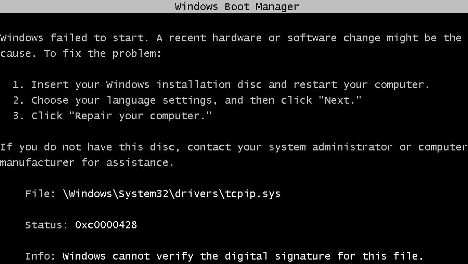
Worse still, the original command to disable the driver signature integrity check permanently from within Windows command prompt, “bcdedit -set loadoptions DDISABLE_INTEGRITY_CHECKS” has been muted in Windows Vista SP1 (prior to SP1 has also been removed via various hotfixes), which returns “an error occurred while attempting to reference the specified entry. The system cannot find the file specified” error message instead. Thus, most modified system files, such as patched tcpip.sys to increase concurrent half-open TCP/IP connection limit can be applied and used.
One way of workaround and resolution to the requirements of code signing with digital signature or certificate that Microsoft trusts problem is by pressing F8 during initial boot of the Windows Vista system, and then select Disable Driver Signature Enforcement in the “Advanced Boot Options” menu. However, the selection only good for the session, and user have to repetitively do the same thing (pressing F8 to disable signed driver enforcement) again and again on every system reboot. If the user forget the disable or turn off the forced driver signing ‘feature’, the system will probably crashes, or simply can’t use.
To make the task of turning off digital certificate signed driver mandatory requirement in x32 and x64 Windows Vista (yes, 32-bit Windows Vista has such security enforcement too, although less strict than 64-bit version) easier, Mr. Orange Sunshine has created ReadyDriver Plus which will allow user to automate the boot up Windows Vista process without driver singing enforcement. ReadyDriver Plus is based on ReadyDriver boot image by Uhlik which has to boot up from CD, floppy drive or USB drive. ReadyDriver Plus improves from original Ready Driver by allowing local hard disk installation, eliminating the need to boot from another device.
ReadyDriver Plus install itself as boot.bin file, and then modifies Windows Vista Boot Configuration Data (BCD), which is then read by Windows Boot Manager (the bootloader for Vista) to load ReadyDriver. When Windows Vista boot loader reads BCD, it loads ReadyDriver which will then makes the appropriate selection to disable Signed Driver Signature Enforcement, based on what user choose to install. So in a way, ReadyDriver Plus manages to permanently disable driver signing enforcement in Windows Vista, both x32 and x64, by automatically select “Disable Driver Signature Enforcement” option in the “Advanced Boot Options” menu on system startup.
Download ReadyDriver Plus 1.1.

There are a few options that user can select during installation of ReadyDriver Plus. However, it’s recommended to leave all options as it’s (especially the /BOOT path, but must be the correct drive letter which Vista is installed), else it defeats the purpose to install ReadyDriver Plus. Dual-boot or multi-boot system should change the keystroke setting accordingly (ReadyDriver Plus will be installed as additional ‘OS’ item under Windows Vista, so you require 1 up stroke to reach Windows Vista OS. If you’re dual-boot, depending on location of Windows Vista on operating system selection menu, the automatic process may need 2 keystrokes to reach the item). Most user should be able to complete the setup by simply clicking “Next”.
ReadyDriver Plus supports both 32-bit and 64-bit (x86 and x64) versions of Windows Vista, including Windows Vista SP1 (Service Pack 1). Ready Driver Plus can be uninstall from Control Panel Programs and Features.

Related Articles
- Ways to Disable or Turn Off User Account (Access) Control (UAC) in Windows Vista
- Windows Vista Cannot Auto Find Driver for New USB Device Plugged In
- Fix Logitech QuickCam (Messenger, Chat, Zoom, IM, Express) Not Compatible Driver Issue in Windows Vista SP1
- Windows Vista Startup Hang and Boot Failure after SP1 on Corrupt Driver File (atapi.sys and ataport.sys)
- Windows Vista Failed to Start with ntkrnlpa.exe or ntoskrnl.exe 0xc0000428 Error Status
- Windows Vista PRODUCT (RED) Signature Pictures Displaying Screen Saver
- How to Disable Windows Vista CD or DVD Drive Auto Eject or Open Feature
- Windows Vista PRODUCT (RED) Signature Wallpapers
- How to Disable Windows Vista CD/DVD Disc Burning/Recording Function
- Workaround to Run VMWare Server on Windows Vista


May 16th, 2008 09:50
[...] the best way, download and install ReadyDriver Plus which permanently automate boot up to Windows Vista with signed driver signature enforcement [...]
May 16th, 2008 09:53
[...] ReadyDriver Plus to permanently disable and turn off disable driver signing enforcement automaticall… on every system [...]
May 17th, 2008 02:19
serioulsy this is the shizz
May 18th, 2008 02:31
[...] and install ReadyDriver Plus 1.1 with default options during installation. ReadyDriver Plus will bypass signed drivers integrity [...]
May 21st, 2008 17:48
[...] driver signature enforcement (If disable forced driver signing requirement fix the issue, check out ReadyDriver Plus that automates disabling of driver signature enforcement, used normally when user installs third-party unsigned driver as in the case of patched tcpip.sys), [...]
May 26th, 2008 22:12
RedyDriver Plus does not work on my system. It just keeps saying that boot.bin can not be found or is corrupt. I have tried uninstalling and reinstalling several times and have even downloaded a fresh copy of RedyDriver and installing with different settings and still does not work. I am running Vista Ultimate x64 with SP1. This driver signing stuff in Vista is raally a pain in the ass!!
June 30th, 2008 09:39
It’s inconsistent on my system. The program seems to go through a random number of “strokes” no matter which number I select during installation, and more often than not will take me to a blank screen with a blinking cursor.
June 30th, 2008 09:41
If anyone has a consistent workaround, please spam it on every forum. Don’t let M$ run our lives PLEASE.
August 11th, 2008 15:26
I’m trying to get ati tray tools for radeon x1600 to work. But getting the infamous “cannot load low level drivers” error. Trying readydriver plus 1.1, I’m getting the same error as Riored. It says boot.bin can not be found or corrupt. Running on vista ultimate x64 sp1. Any suggestions?
August 29th, 2008 08:54
On my system, I dont see a file boot.bin under directory \BOOT.
As a result when I reboot system after installing ReadyDriver, it just keeps saying that boot.bin can not be found or is corrupt. I have tried uninstalling and reinstalling several times and have even downloaded a fresh copy of RedyDriver and installing with different settings and still does not work.
September 1st, 2008 22:26
i get an error message:readydriver plus 1.1
uninstall previous versions first at control panel,. add/remove programs
my problem is i had an startup issue and it used a system restore, to fix it
now it WONT show Readydriverplus at all
even with your uninstaller it wont show up
neither a manual search works, ??? how do i manually uninstall: readydriver plus 1.1
ive used the app before ok, now i removed the tcpip.sys and readydriver plus 1.1, but i cant installl it now, so frack, anyone knows
RMT
September 4th, 2008 08:49
First I installed ReadyDriver Plus. THEN I patched tcpip.sys. You must use the right patcher for the VERSION of tcpip.sys you have. If your version is 18063 — use ver 2.2 of the patcher. Available here:
http://www.mydigitallife.info/2008/02/17/download-vista-tcpipsys-and-uac-auto-patcher-to-increase-tcp-connection-limit/
DBD
September 10th, 2008 06:39
Como desfaço as mudanças no sistema que o ready driver faz na tela de boot ?
Já fiz o restauro de sistema e ponto de restaurãção e a tela de boot original do Vista não retornou !
Alguém que tenha conseguido retirar ess eprograma do boot podería me ensinar ?
Obrigado.
September 19th, 2008 01:53
Hi all,
for the people who are using dual boot with Windows XP and Vista. The application standard uses the drive letter where Vista is installed. If you install it here and it is not working try and look in the drive where XP is installed (uncheck the hide protected operations system files under folder options). You should look for a folder called boot. If this folder is located on the drive where XP is installed, then you need to install this application also on this drive. The key stroke is still 1.
Works for me, thanks.
September 19th, 2008 05:37
[...] think ATI Tray Tools works. But you must download ready driver plus. __________________ Can I Overclock My Brain?… All I Gotta Do Is Increase Its Stock Voltage [...]
October 6th, 2008 00:41
I’ve got a single boot computer with Vista x64, and when I installed ReadyDriver Plus and restarted, it selected to boot ReadyDriver Plus, but then it just hung. I had to get out my Vista installation disc and fix my tcpip.sys before I could get Windows up and running at all.
November 4th, 2008 00:50
OS: Vista x64 SP1
Patch: Version 2.2
TCPIP: 18063
ReadyDriver: Version 1.1
1. Patch
- Ok, everything perfect.
2. Setup ReadyDriver
- Ok.
3. Reboot
- After 2 ‘multiboot auto-selections’, hang - black screen.
