
How to Uninstall and Remove Windows Genuine Advantage (WGA) Validation Plug-In for Firefox (npLegitCheckPlugin.dll)

Microsoft had released a Firefox version of Windows Genuine Advantage Validation Tool (WGA), in the form of plug-in or add-on. When user tries to download WGA genuine Windows restricted software from Microsoft Download Center, user is prompted to download and install WGAPluginInstall.exe which will perform validation test on legitimacy of Windows XP or Vista installed.

WGAPluginInstall.exe setup install npLegitCheckPlugin.dll and nsILegitCheckPlugin.xpt into Mozilla Firefox program directory. If user enter about:plugins in the Firefox address bar and hit Enter, he or she will see the following information:
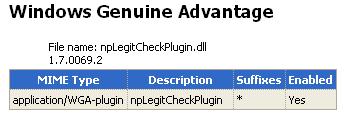
WGA Plugin in Firefox
WGA-pluugin with file name as npLegitCheckPlugin.dll version 1.7.0069.2.

Unfortunately, Microsoft does not provide an easy way to remove or uninstall the WGA plugin for Firefox. For users who have installed the WGA validation plugin for Firefox, use the following hack to clean, remove or uninstall the plug-in.

Go to C:\Program Files\Mozilla Firefox\plugins folder, and then delete the npLegitCheckPlugin.dll file. Then, go to C:\Program Files\Mozilla Firefox\components folder, and delete the nsILegitCheckPlugin.xpt file (if you have use the trick to install WGA plugin for Firefox in other than default Firefox location, find the plugin in the changed folder). After deletion , the WGA plugin is removed, and user can confirm the deletion by using “about:plugins” command again in Firefox.



5 Responses to “How to Uninstall and Remove Windows Genuine Advantage (WGA) Validation Plug-In for Firefox (npLegitCheckPlugin.dll)”

  1. Lucy
    June 10th, 2008 13:35
    1

    I tried it and it worked but…
    when I restarted my computer the annoying notifications came up so I decided to get rid of this. In case someone needs this here it is.

    1.Back up your registry (make a system restore point in case something happens).
    2.Reboot windows in safe mode(hold f8 key)
    3.Run: registry edit “regedit.exe” it opens and search for “wgalogon” folder and delete.(Just go to edit tab and find).
    4.Go to My Computer and click on search tab and find “wga” files and delete.
    5.Then again Run : “c:\Windows\system32″ look for “wgatray.exe” and “wgalogon.dll” and delete.
    6. Run: “dllcache” and look for “wgatray.exe” and “wgalogon.dll” and delete. Just turn off and restart. ALL DONE.

  2. crina
    October 21st, 2008 16:41
    2

    Lucy, thanks a lot. The pesky wga is gone. Now for future users of this method - which isn;t as complicated as it sounds - if you can’t delete the wgatray and wgalogon.dll in system 32, jump to running “dllcache” and delete wgatray.exe and wgalogon.dll there. then i moved wgatray and wgalogon from system 32 on my desktop.
    then, after restarting, i could simply delete the two icons without any “cannot delete…” message.
    hope it works for you too.

  3. manos
    October 31st, 2008 06:33
    3

    yeap worked like a charm thanx ppl i preferred on jumping straight to the dllcase and after to the registry and then just deleting the files
    thanx again for you help!!

  4. jeff
    November 8th, 2008 15:35
    4

    it won’t let me delete “npLegitCheckPlugin.dll” from the plugins folder… it says “Access Denied” … what now? .. should i go through with Lucy’s instructions anyway? … thanks for the help so far

  5. hey
    November 20th, 2008 13:16
    5

    Ty Lucy and Crina, works perfectly

Leave a Reply

You can use these tags: <a href="" title=""> <abbr title=""> <acronym title=""> <b> <blockquote cite=""> <cite> <code> <del datetime=""> <em> <i> <q cite=""> <strike> <strong>

Subscribe to comments feature has been disabled. To receive notification of latest comments posted, subscribe to Tip and Trick Comments RSS feed or register to receive new comments in daily email digest.
Custom Search

Incoming Search Terms for the Article

oga remover - remove OGA - wga sp3 - Remove WGA - wga hack - wga removal - wga - oga remove - wga remover - uninstall wga - sp3 wga - wga remove - sp3 genuine advantage - remove wga sp3 - xp sp3 genuine advantage - disable wga - OGA removal - windows genuine hack - windows genuine advantage hack - uninstall oga - remove windows genuine advantage - bypass windows genuine advantage - genuine advantage hack - bypass windows genuine - how to remove wga - WGA uninstall - disable oga - windows genuine advantage SP3 - xp sp3 wga - uninstall windows genuine advantage - genuine remover - remove wgatray - uninstal genuine - m - wga remove sp3 - uninstall wga plugin - oga removal tool - wga uninstal - wga plugin uninstall - sp3 without wga - uninstall genuine - how to remove windows genuine advantage - how to remove windows genuine - Windows Genuine Advantage - all - uninstall genuine advantage - windows xp sp3 genuine advantage - wga remover sp3 - how to uninstall Windows Genuine Advantage - wga 1.7.0069.2 - npLegitCheckPlugin.dll - remove windows genuine - Genuine uninstal - wga disable - DISABLE WGA SP3 - uninstall windows genuine - uninstall OGA Plugin - windows genuine advantage removal - Disable Windows Genuine Advantage - hack wga - m3 - nsILegitCheckPlugin.xpt - remove wga xp sp3 - Removewga sp3 - wgatray removal - genuine uninstall - m2 - wga in sp3 - windows genuine - genuine advantage sp3 - windows genuine advantage validation tool - wga removal tool - xp sp3 remove wga - WGA for SP3 - wga removal sp3 -