


How to Enable, Use and Support 4GB or More Physical RAM Memory in 32-bit Windows Vista
Theoretically, x86 and x86-64 processors can support more than 4 GB (gigabytes) of physical memory (RAM) in 32-bit systems, such as in the case of 32-bit Windows Vista operating system. With increasingly affordable and cheap RAM memory module, PC with 4GB or even 8GB of RAM memory sticks. However, to many disappointment, 32-bit (x86) edition of Windows Vista can only ‘see’ and support a maximum of 4GB RAM memory.
Worse still, x86 Windows Vista computer with physical memory that bigger or more than 4GB may has memory address space (usable RAM) of only 2 to 3.8 GB (typically 3.12 GB) available to the operating system (Windows Vista SP1 does not change the usage behavior as KB946003 confirms that it’s just reporting change that correct the way Windows Vista reports amount of RAM installed), as operating system reserves some physical address space as I/O regions for memory mapped peripherals and devices. These memory-mapped I/O (MMIO) must be mapped in the first 4 GB of memory address space. So if 4 GB of system memory is already installed, part of the 4GB address space must be overwritten and reserved as MMIO, effectively reducing the total amount of system memory available. For example, video graphic card with on-board memory of 256 MB will take up 256MB memory address space, reducing the 4GB of memory to 3.75GB literally.
However, maximum memory limit for 32-bit Windows Vista is not a hardware or architecture limitation. In fact, Physical Address Extension (PAE) feature has been added to x86 and x86-64 processors (since Intel Pentium Pro and AMD Athlon or newer models) to allow more than 4 gigabytes (GB) of physical memory to be used in 32-bit systems, given appropriate operating system support. However, out of commercial or marketing decision, Microsoft decides to enforce maximum physical memory limit support for 32-bit Windows Vista to 4 GB, with or without PAE mode enabled (Windows Vista enables PAE by default as it’s required for hardware DEP / NX).
Microsoft advises all Windows Vista system that wants to use all 4GB or more physical memory fully to install 64-bit (x64) Windows Vista. However, in view of lack of support and compatibility issues for many drivers, applications and programs that haven’t been ported to 64-bit code base, this upgrade option is probably not prefer by many user, especially novice or generalize customers.
Chinese hacker has managed to crack the maximum memory limit imposed by Microsoft on 32-bit Windows Vista. The trick is to transfer or transplant the more memory support feature in 32-bit Windows Server 2008 to Windows Vista, which use similar kernel code. Windows Server 2008 Enterprise or Datacenter x86 edition supports up to 64GB of physical memory, a far higher limit comparing with paltry 4GB limit imposed on x86 Windows Vista.
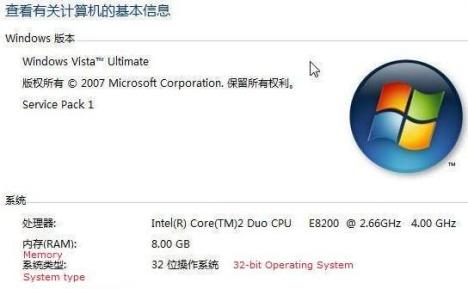
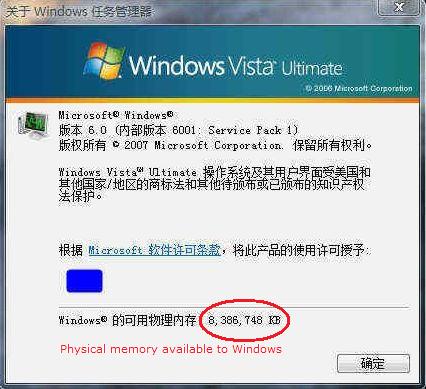
To perform the hack to enable the support for more than 4GB of memory in 32-bit Windows Vista, follow these steps:
- Download and install 32-bit Windows Server 2008 Enterprise Edition, and activate the installed operating system.
If you can’t install Windows Server 2008 Enterprise Edition, or has no way to perform product activation on Windows Server 2008 or lack of product key, you can download and use the copy of required files extracted from activated Windows Server 2008 system, posted below.
- Copy the following files from Windows Server 2008 to a removable drive:
%systemdrive%\Windows\System32\licensing\pkeyconfig\pkeyconfig.xrm-ms
%systemdrive%\Windows\ServiceProfiles\NetworkService\AppData\Roaming\Microsoft\SoftwareLicensing\tokens.dat - In Windows Vista, backup the same two files in the same paths for future recovery or restore purpose by copying the files as another copy, to other location or simply renaming the files:
%systemdrive%\Windows\System32\licensing\pkeyconfig\pkeyconfig.xrm-ms
%systemdrive%\Windows\ServiceProfiles\NetworkService\AppData\Roaming\Microsoft\SoftwareLicensing\tokens.dat - In Windows Vista, run Services (in Start Search), and stop the Software Licensing service.
- Take ownership and grant full control permissions to logged on user account or Administrators user group for the 2 files:
%systemdrive%\Windows\System32\licensing\pkeyconfig\pkeyconfig.xrm-ms
%systemdrive%\Windows\ServiceProfiles\NetworkService\AppData\Roaming\Microsoft\SoftwareLicensing\tokens.dat - Replace and overwrite the Windows Vista version of pkeyconfig.xrm-ms and tokens.dat with the version copied from Windows Server 2008.
- Restart the computer.
- Voila, all installed RAM including large amount of 4 GB or more is now usable by 32-bit Windows Vista.
Download server2008_pkeytokens.rar with 2 Windows Server 2008 Enterprise Edition files, namely tokens.dat and pkeyconfig.xrm-ms to skip the step to install and activate Windows Server 2008.
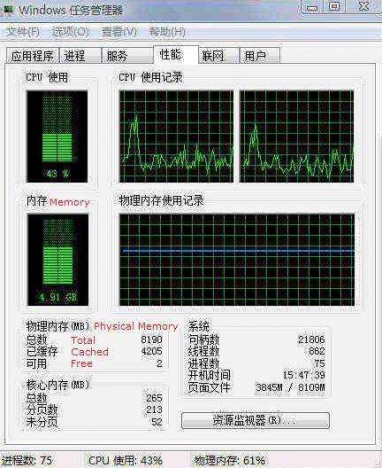
Replacing the pkeyconfig.xrm-ms and tokens.dat should not affect daily usage and functionality of Windows Vista. There may be minor problem such as there is no more Windows Experience Index rating shown, and unable to access “Computer Management” by “Manage” on Computer’s right click menu. On some system, there may be activation issue (such as require to activate Windows Vista again) after replacing the files with the copy from Windows Server 2008. In the case, activate Windows Vista with a product key for Windows Server 2008.
Note that some forums and blogs have instructed readers to run “BCDEdit /set PAE forceenable” command to enable and turn on PAE in Windows Vista. This is incorrect, as PAE is always enabled in Windows Vista together with DEP, and verifiable via Everest. The 4GB limit in 32-bit Windows Vista is simply a software-implemented limitation.


Recent Articles
- How To Download HBO Shows On iPhone, iPad Through Apple TV App
- Windows 10 Insider Preview Build 19025 (20H1) for PC Official Available for Insiders in Fast Ring – Here’s What’s News, Fixes, and Enhancement Changelog
- Kaspersky Total Security 2020 Free Download With License Serial Key
- Steganos Privacy Suite 19 Free Download With Genuine License Key
- Zemana AntiMalware Premium Free Download For Limited Time