
How to Enable, Use and Support 4GB or More Physical RAM Memory in 32-bit Windows Vista

Theoretically, x86 and x86-64 processors can support more than 4 GB (gigabytes) of physical memory (RAM) in 32-bit systems, such as in the case of 32-bit Windows Vista operating system. With increasingly affordable and cheap RAM memory module, PC with 4GB or even 8GB of RAM memory sticks. However, to many disappointment, 32-bit (x86) edition of Windows Vista can only ’see’ and support a maximum of 4GB RAM memory.

Worse still, x86 Windows Vista computer with physical memory that bigger or more than 4GB may has memory address space (usable RAM) of only 2 to 3.8 GB (typically 3.12 GB) available to the operating system (Windows Vista SP1 does not change the usage behavior as KB946003 confirms that it’s just reporting change that correct the way Windows Vista reports amount of RAM installed), as operating system reserves some physical address space as I/O regions for memory mapped peripherals and devices. These memory-mapped I/O (MMIO) must be mapped in the first 4 GB of memory address space. So if 4 GB of system memory is already installed, part of the 4GB address space must be overwritten and reserved as MMIO, effectively reducing the total amount of system memory available. For example, video graphic card with on-board memory of 256 MB will take up 256MB memory address space, reducing the 4GB of memory to 3.75GB literally.

However, maximum memory limit for 32-bit Windows Vista is not a hardware or architecture limitation. In fact, Physical Address Extension (PAE) feature has been added to x86 and x86-64 processors (since Intel Pentium Pro and AMD Athlon or newer models) to allow more than 4 gigabytes (GB) of physical memory to be used in 32-bit systems, given appropriate operating system support. However, out of commercial or marketing decision, Microsoft decides to enforce maximum physical memory limit support for 32-bit Windows Vista to 4 GB, with or without PAE mode enabled (Windows Vista enables PAE by default as it’s required for hardware DEP / NX).

Microsoft advises all Windows Vista system that wants to use all 4GB or more physical memory fully to install 64-bit (x64) Windows Vista. However, in view of lack of support and compatibility issues for many drivers, applications and programs that haven’t been ported to 64-bit code base, this upgrade option is probably not prefer by many user, especially novice or generalize customers.

Chinese hacker has managed to crack the maximum memory limit imposed by Microsoft on 32-bit Windows Vista. The trick is to transfer or transplant the more memory support feature in 32-bit Windows Server 2008 to Windows Vista, which use similar kernel code. Windows Server 2008 Enterprise or Datacenter x86 edition supports up to 64GB of physical memory, a far higher limit comparing with paltry 4GB limit imposed on x86 Windows Vista.
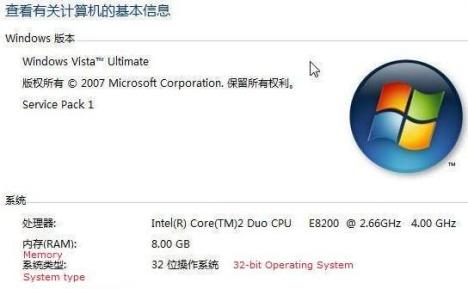
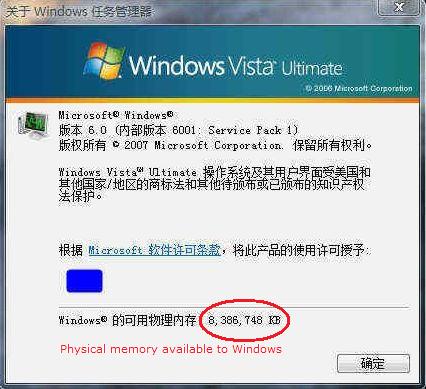
32-bit Windows Vista 4GB Memory Limit Hack
x86 Windows Vista Using More Than 4GB RAM Hack

To perform the hack to enable the support for more than 4GB of memory in 32-bit Windows Vista, follow these steps:

  1. Download and install 32-bit Windows Server 2008 Enterprise Edition, and activate the installed operating system.

    If you can’t install Windows Server 2008 Enterprise Edition, or has no way to perform product activation on Windows Server 2008 or lack of product key, you can download and use the copy of required files extracted from activated Windows Server 2008 system, posted below.

  2. Copy the following files from Windows Server 2008 to a removable drive:

    %systemdrive%\Windows\System32\licensing\pkeyconfig\pkeyconfig.xrm-ms
    %systemdrive%\Windows\ServiceProfiles\NetworkService\AppData\Roaming\Microsoft\SoftwareLicensing\tokens.dat

  3. In Windows Vista, backup the same two files in the same paths for future recovery or restore purpose by copying the files as another copy, to other location or simply renaming the files:

    %systemdrive%\Windows\System32\licensing\pkeyconfig\pkeyconfig.xrm-ms
    %systemdrive%\Windows\ServiceProfiles\NetworkService\AppData\Roaming\Microsoft\SoftwareLicensing\tokens.dat

  4. In Windows Vista, run Services (in Start Search), and stop the Software Licensing service.
  5. Take ownership and grant full control permissions to logged on user account or Administrators user group for the 2 files:

    %systemdrive%\Windows\System32\licensing\pkeyconfig\pkeyconfig.xrm-ms
    %systemdrive%\Windows\ServiceProfiles\NetworkService\AppData\Roaming\Microsoft\SoftwareLicensing\tokens.dat

  6. Replace and overwrite the Windows Vista version of pkeyconfig.xrm-ms and tokens.dat with the version copied from Windows Server 2008.
  7. Restart the computer.
  8. Voila, all installed RAM including large amount of 4 GB or more is now usable by 32-bit Windows Vista.

Download server2008_pkeytokens.rar with 2 Windows Server 2008 Enterprise Edition files, namely tokens.dat and pkeyconfig.xrm-ms to skip the step to install and activate Windows Server 2008.
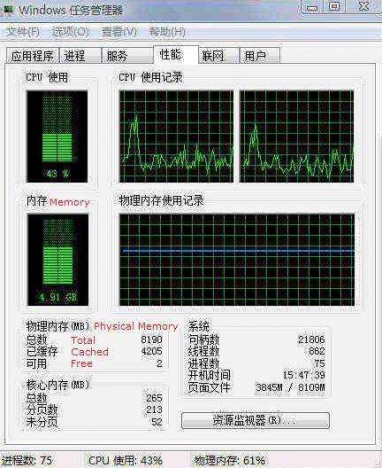
32-bit Windows Vista (x84) 4GB Memory Hack

Replacing the pkeyconfig.xrm-ms and tokens.dat should not affect daily usage and functionality of Windows Vista. There may be minor problem such as there is no more Windows Experience Index rating shown, and unable to access “Computer Management” by “Manage” on Computer’s right click menu. On some system, there may be activation issue (such as require to activate Windows Vista again) after replacing the files with the copy from Windows Server 2008. In the case, activate Windows Vista with a product key for Windows Server 2008.

Note that some forums and blogs have instructed readers to run “BCDEdit /set PAE forceenable” command to enable and turn on PAE in Windows Vista. This is incorrect, as PAE is always enabled in Windows Vista together with DEP, and verifiable via Everest. The 4GB limit in 32-bit Windows Vista is simply a software-implemented limitation.



52 Responses to “How to Enable, Use and Support 4GB or More Physical RAM Memory in 32-bit Windows Vista”

Pages: « 3 2 [1] Show All

  1. net.cat
    May 26th, 2008 20:08
    25

    if i had a winserv08 valid serial… :( it worked!

  2. net.cat
    May 26th, 2008 15:38
    24

    personalize menu doesn’t work too…..it’s a disaster!!!!

  3. net.cat
    May 26th, 2008 15:20
    23

    however i tried this guide and the response is not so good…i think now 4gb are enabled but…computer->proprieties doesn’t work…windows update doesn’t open….control panel doesn’t open….how could i fix all this?

  4. net.cat
    May 26th, 2008 15:02
    22

    [...]after replacing the files with the copy from Windows Server 2008. In the case, activate Windows Vista with a product key for Windows Server 2008.[...]

    ok. but than i should consider my OS as Vista or WS08? which will be my upgrades in winUp ?

  5. Eternalmoonlight.net » Life tips #10
    May 26th, 2008 11:46
    21

    [...] How to Enable, Use and Support 4GB or More Physical RAM Memory in 32-bit Windows Vista [...]

  6. Wolfdale
    May 26th, 2008 04:45
    20

    I replaced only the tokens.dat file but it still does not work. I still have 3.3GB out of 4GB. The Properties page not does work either. I guess I may just have to wait for a proper activation method for Windows 2008 32-bit and then configure/convert it to Windows Ultimate.

  7. dan
    May 26th, 2008 02:43
    19

    It does say Vista on the properties page, but I did indeed get notified by WU that there was a 2008 server update I needed. There are some other things I discovered last night which caused me to switch back. I noticed the snipping tool no longer worked. Also, I could not access Add/Remove Windows components from Programs and Features in the control panel. So – now I’m back to 3581 RAM, just like before – hopefully someone will come up with a better hack someday!

  8. net.cat
    May 25th, 2008 15:00
    18

    dan you tried that method on vista? if yes, i think if you look at computer -> proprieties and there you see “Windows Vista”… i think windows update will send you vista upgrade… am i wrong? or am i stupid? :P

  9. dan
    May 25th, 2008 13:07
    17

    http://windowsserver2008.dyndns.org/activation.asp

    (click bypass link)

    OK, right before I gave up, I tried the above procedure. Seems to work, but yeah I feel pretty dirty just trying to get my 4gb! The only thing that bothers me still is I’m worried I won’t get any Vista updates, only 2008 ones – time will tell. And yes, you only need to replace tokens.dat to get this to work.

  10. dan
    May 25th, 2008 12:32
    16

    Yeah, no matter what, you cannot activate 2008. I even tried downloading a KMS server VMWare to no avail. All the hacks for Server 2008 involve replacing tokens.dat with a Vista version! So this really can’t be viable longterm.

  11. net.cat
    May 24th, 2008 15:59
    15

    so there isn’t yet a good solution if ws08’s crack still doesn’t work 1oo% ! :(

  12. admin
    May 24th, 2008 13:36
    14

    Try to replace just tokens.dat instead of both 2 files, and see if some problems fade away.

    You have to use activation crack for Windows Server 2008 if still got problem.

  13. Wolfdale
    May 24th, 2008 06:56
    13

    I have Windows Vista 32 bit installed. It runs on top of the grub bios emulator. Fully activated, updates running, etc. I booted with a Vista PE USB drive, rename the files and then copied the one you posted above. Still, my Vista reads 3.4 GB RAM. I have 4 GB RAM installed.

    Why isn’t this hack working for me?

    Also Computer->right click->Manage works. What does not work for me is Computer->right click->properties.

    Is this a joke or can anybody verify that this actually works. I hope is is not some form of virus or spyware.

  14. dan
    May 24th, 2008 01:37
    12

    … and by “working happily”, I mean that I see all of my 4gb in Task manager. (Ever since SP1, I’ve seen it reflected on the system properties page) Also, the above mentioned aberrations are present. I cannot go to computer management by right clicking and selecting manage. When I reboot, I am asked to provide a reason, just like a server o/s. Most importantly, folks, is I got a critical 2008 server update from Windows Update this morning. I’m guessing you do NOT want to install these, and if you are doing so automatically, you are in for trouble. Just a guess. :)
    So, whoever wrote this article – what can I do about the activation problem??

  15. dan
    May 24th, 2008 01:05
    11

    OK, I have had moderate success with this after following the directions, but the activation thing is disturbing me. Of course MS now wants a server 2008 enterprise product key, (after using the files provided) and why would I have one of those? I just want to use all of my 4GB. So while it’s working happily right now, soon I’ll have to revert back.

  16. admin
    May 24th, 2008 00:47
    10

    Theoretically language won’t care. But you have to try it up.

  17. net.cat
    May 24th, 2008 00:05
    9

    hi guys…this is my first message here!

    fantastic website ;)

    about this topic…i got an italian version of vista…shall i use italian version of server08 ’s files ? and what about ” activate vista as windows server 2008 ” as “admin” says !?

    p.s. sry 4 my english…it’s very bad i know :P

  18. admin
    May 23rd, 2008 23:13
    8

    You have to use Windows Server 2008 activation method after replacing the 2 files. These 2 files is activation related.

  19. b
    May 23rd, 2008 22:51
    7

    I, too, had issues with this solution. I was unable to re-key my license after the reboot (using OEM loader).

  20. admin
    May 23rd, 2008 22:34
    6

    Are you using same language editions of the files?

  21. Raymund Dobay
    May 23rd, 2008 19:30
    5

    My system (Ultimate SP1 x86) crashed after replacing the system files with the ones downloaded from the link. After reboot I got kind of
    “Licencig service could not start, Check for a
    solution and restart the program/restart the program” looping error message.
    The only resscue was reset>safe mode with command prompt> rstrui.
    Could any of you get it work?

  22. moryabdi
    May 23rd, 2008 16:33
    4

    download link have problem with firefox
    try download from opera or download that from here
    files + info
    http://rapidshare.com/files/116960882/server2008_pkeytokens.rar

  23. moryabdi
    May 23rd, 2008 16:24
    3

    wow!
    what about 64 bit processing? doesn’t work on win32 anyway!

  24. kent
    May 23rd, 2008 16:22
    2

    The download link for server2008_pkeytokens.rar does NOT WORK. It says “Your request url not found” after submit a correct verification code.

  25. Vista 32-Bit mehr als 4GB Ram - drvista.de
    May 23rd, 2008 15:45
    1

    [...] 32-Bit mehr als 4GB Ram How to Enable, Use and Support 4GB or More Physical RAM Memory in 32-bit Windows Vista Tip and Trick [...]

Pages: « 3 2 [1] Show All

Leave a Reply

You can use these tags: <a href="" title=""> <abbr title=""> <acronym title=""> <b> <blockquote cite=""> <cite> <code> <del datetime=""> <em> <i> <q cite=""> <strike> <strong>

Subscribe to comments feature has been disabled. To receive notification of latest comments posted, subscribe to Tip and Trick Comments RSS feed or register to receive new comments in daily email digest.
Custom Search

Incoming Search Terms for the Article

12319 - server2008_pkeytokens.rar - vista 4gb - windows xp 4gb - vista memory limit - vista 4gb ram support - memory - 4GB - tokens.dat - vista ram - enable 4GB ram in Vista - 4 gig ram vista x86 - server 2008 tokens.dat - vista memory hack - vista ram hack - how to use 4GB of RAM on windows vista 32-bit operating system - windows vista memory limit - server2008_pkeytokens.rar - xp 4gb hack - vista 4gb support - enable 4gb ram vista - vista memory limitations - server2008_pkeytokens - vista 4gb hack - xp 4gb ram hack - enable 4gb xp - enable 4gb ram on vista - xp ram hack - windows xp 4gb ram hack - enable 4gb in xp - enable 4GB in Windows xp - 4gb ram - windows server 2008 4gb - windows xp 4gb hack - Enable 4GB RAM XP - how to enable 4gb in xp - enable 4gb ram in xp - windows vista 4gb - windows xp enable 4gb RAM - xp support 4GB ram - vista and "maximum physical memory" - vista maximum ram support - %systemdrive%WindowsSystem32licensingpkeyconfigpkeyconfig.xrm-ms - KB946003 - vista support 4 gb - xp enable 4gb - Enable 8GB of memory on Vista - 4gb ram vista 32 bit hack - How to use all 4 gigs of ram in vista - vista and 4gb ram - vista 4 gb - How to enable 4GB RAM in Windows XP - enable 4 g ram in vista 32 - can I install more than 4gb on vista 32 - vista 32 bit ram support - enable 4BG RAM - vista ram support - how to 4gb of ram in windows xp pro 32 bit - how to enable more than 4 gig of memory in vista - install 8gb ram in vista sp1 - 64 bit system how to get 4 g ram - enable 4gb ram on windows xp - windows vista 4gb hack - windows xp 4gb memory hack - enable 4gb windows xp - xp memory hack 4gb - vista 4 gb ram - windows xp ram hack - How to Enable 4GB of RAM with Vista (x86) - vista support 4gb - enable 8gb ram in vista - vista 4gb ram - enable 4 gig ram xp - enable 4GB of Memory on XP - windows vista 32 more than 4 gigs support -