


How to Create a Shortcut to Close the CD/DVD Drive
We can create a shortcut to open or eject the CD/DVD drive, it’s time to create another shortcut to close the CD/DVD-ROM or CD/DVD burner or writer drive disc tray automatically. The “Close CD” shortcut is useful for users who place computer at a distance away or in obscure inconvenient position that they able to close the drive without the need to press on physical button on the optical drive.
As with “Open CD/DVD” button, we have to make use of a third party program that provides functions to operate the door of CD-ROM or DVD-ROM drive. There are a few utility that able to open, eject or close the door or disc tray of CD and DVD drive, including NirCmd by NirSoft (download NirCmd) and Wizmo by GRC (download Wizmo). But note that the “Close CD/DVD” shortcut can only be used to close optical drive on desktop computer. It won’t work on notebook or laptop computer’s CD/DVD drive.
Create a Shortcut to Close the CD/DVD Drive’s Door or Disc Tray
Firstly, download one of the application (NirCmd or Wizmo) using links above. If you choose NirCmd, extract the content to a folder. For Wizmo, install the application.
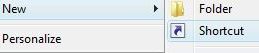
Right-click on blank space desktop or anywhere else that you want the “Close CD Drive” or “Close DVD Drive” shortcut to be, then choose New in the context menu, and finally click on Shortcut.
When prompted to type in the location of the item, enter the full path to NirCmd.exe or Wizmo.exe file that has been downloaded. User can click on Browse button to visually locate the executable too.
For NirCmd, append the cdrom close text to the end of the path so that the target looks similar to the following:
“C:\Program Files\NirCmd\nircmd.exe” cdrom close
Note: If you planning to use NirCmd to open your CD/DVD drive, use the following command, where D represent that drive letter for the CD/DVD drive.
“C:\Program Files\NirCmd\nircmd.exe” cdrom open D:
For Wizmo, append the close text to the end of the patch so that the target looks similar to the following:
“C:\Program Files\Wizmo\wizmo.exe” close
Note: If you planning to use NirCmd to open your CD/DVD drive, use the following command, where D represent that drive letter for the CD/DVD drive. If only “open” is specified, default optical drive will be ejected.
“C:\Program Files\Wizmo\wizmo.exe” open=D:
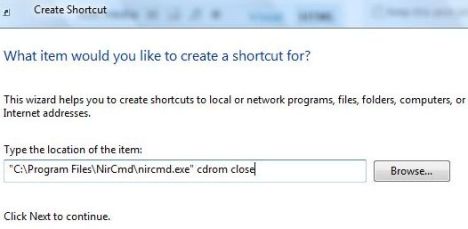
Click on Next button when done.
When asked to name the shortcut, enter a name to display with the shortcut, such as “Close CD-DVD Drive”, and then click on Finish to create the shortcut.
After the shortcut has been created, you can change the icon for the shortcut.


Recent Articles
- How To Download HBO Shows On iPhone, iPad Through Apple TV App
- Windows 10 Insider Preview Build 19025 (20H1) for PC Official Available for Insiders in Fast Ring – Here’s What’s News, Fixes, and Enhancement Changelog
- Kaspersky Total Security 2020 Free Download With License Serial Key
- Steganos Privacy Suite 19 Free Download With Genuine License Key
- Zemana AntiMalware Premium Free Download For Limited Time