


How to Create a Duplicate Identical Copy of Worksheet in Office Excel
In Microsoft Office Excel (including Excel 2003 and Excel 2007), user can easily create another duplicate copy of worksheet that has the exactly identical contents and data from the original sheet. Creating another copy of worksheet is useful if user want to try out new formula, calculation, font, format or other changes, and don’t want to risk messing up the original version, or want to be able to quickly revert to original worksheet when anything goes wrong.
To create another exact identical copy of worksheet, press and hold Ctrl key, then click on the tab of the sheet that want to create a copy and drag the cursor in the form of tab with plus sign to the left or right past the original tab location of the spreadsheet or workbook (if the tab location is already far left or far right, you can only drag it to the right or left respectively). The new location user drop the tab-cursor will be the location of the new duplicate worksheet tab.
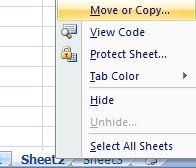
Alternatively, right click on the tab of worksheet to duplicate, the select Move or Copy.
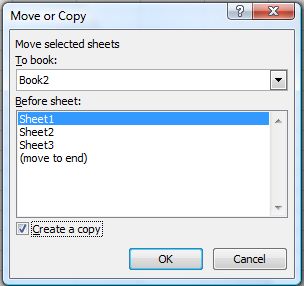
Then, on “Move or Copy” dialog box, tick the check box for Create a Copy, and select the location of the new tab for the exactly duplicated worksheet. User can even create the new copy of sheet in another workbook. Click OK when done.


Recent Articles
- How To Download HBO Shows On iPhone, iPad Through Apple TV App
- Windows 10 Insider Preview Build 19025 (20H1) for PC Official Available for Insiders in Fast Ring – Here’s What’s News, Fixes, and Enhancement Changelog
- Kaspersky Total Security 2020 Free Download With License Serial Key
- Steganos Privacy Suite 19 Free Download With Genuine License Key
- Zemana AntiMalware Premium Free Download For Limited Time