


Download WebMon 1.0.11 to Monitor Websites Updates Periodically
How you normally get an updates from your favorite websites without personally browsing them? RSS is a good way but the problem is not all websites supporting it. I used to browse my favorite websites that are bookmarked earlier one by one until I discover this. Known as WebMon 1.0.11, it is a tiny software utility that helps to monitor any updates from your favorite websites periodically without any miss.
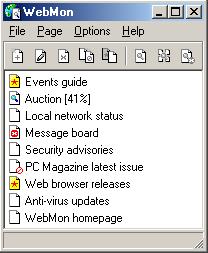
The tiny software utility only consumes less than 800kB, which is quite suitable for any PC system installation. After installing that, user is able to input any websites’ links so that it can help to monitor the websites change by comparing previous and new updates. Good thing is, it is able to serve unlimited number of websites as long as you key them in. Besides, the websites monitoring intervals are configurable in minutes, hours or even days on how long you want to get the updates once. One advice, in order not to overload your CPU cycles to do unnecessary checking, it is good to set them to monitor in daily basic or longer than that.
Unless you are really enjoy browsing websites for new stuffs, else this could be a good solution that is able to save plenty of your time checking if one website has been updated or not, especially when you are trying to monitor tenths or hundreds of websites in one time. The software utility is free for direct download here or download at WebMon.


Recent Articles
- How To Download HBO Shows On iPhone, iPad Through Apple TV App
- Windows 10 Insider Preview Build 19025 (20H1) for PC Official Available for Insiders in Fast Ring – Here’s What’s News, Fixes, and Enhancement Changelog
- Kaspersky Total Security 2020 Free Download With License Serial Key
- Steganos Privacy Suite 19 Free Download With Genuine License Key
- Zemana AntiMalware Premium Free Download For Limited Time