


Download CoreTemp 0.98.1 to Monitor Processor Temperature by Reading from Internal Registers
Have you even wondered how hot the system’s processor is while serving all the applications running on your PC or laptop. Now with the CoreTemp 0.98.1 installed on your system, it will provide all the necessary temperature information so that you know how thermal efficient your processor is. Regardless of if your processor is single or multi-cores, it will able to display the data for all cores accurately as it reads from registers that stores the temperature information dynamically.
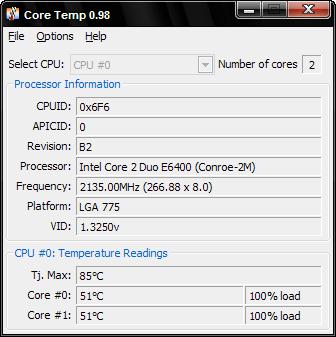
You may wonder how it works. The mechanism behind is it relies on the DTS (Digital Thermal sensors) that are embedded near the core in the dies. As compared to some of the traditional methods of using thermo-couples that measure the processor dies from external, the DTS will be able to give more accurate results. The temperature information gotten from DTS will be stored in MSR (Model Specific Register) from time to time. What the program does is it will read from these registers and then compare to its junction temperature ratings (specific to each core) and the actual temperature of the processor will be calculated and known.
At this moment, not all systems (mainly processors) can make full advantages of it. You may want to find out the system compatibility by referring to Support Lists. Anyway, it covers nicely for both Intel and AMD processors ranging from Intel Pentium, Celeron up to Xeon and AMD K8, K10 and more. Best things are, the software utility is very tiny and free for download at CoreTemp. It works well on Windows 2000, XP, 2003 and Vista (both 32bit and 64bit versions).


Recent Articles
- How To Download HBO Shows On iPhone, iPad Through Apple TV App
- Windows 10 Insider Preview Build 19025 (20H1) for PC Official Available for Insiders in Fast Ring – Here’s What’s News, Fixes, and Enhancement Changelog
- Kaspersky Total Security 2020 Free Download With License Serial Key
- Steganos Privacy Suite 19 Free Download With Genuine License Key
- Zemana AntiMalware Premium Free Download For Limited Time