


Consolidate and Streamline Messaging Activities Via Mozilla’s Snowl
Website has developed from a pre-defined information presentation platform in those early days to a more dynamic and communicative place. It has become a trend in this techno era whereby users are enjoying conversing or messaging facilities available online such as leaving comment threads, RSS feeds, forum, Twitter, etc. With an increasing variety of protocols and providers on this conversing activity, monitoring or keeping track of individual’s own conversations is harder. To make life easier, Mozilla labs have brought to Firefox users a new messaging experience via its newly released plugin, Snowl.
As highlighted by Mozilla Labs, Snowl is a prototype Firefox extension that integrates messaging into the browser based on a few key ideas:
1. It doesn’t matter where messages originate. They’re alike, whether they come from traditional email servers, RSS/Atom feeds, web discussion forums, social networks, or other sources.
2. Some messages are more important than others, and the best interface for actively reading important messages is different from the best one for casually browsing unimportant ones.
3. A search-based interface for message retrieval is more powerful and easier to use than one that makes you organize your messages first to find them later.
4. Browser functionality for navigating web content, like tabs, bookmarks, and history, also works well for navigating messages.
The overall idea of Snowl is quite creative and interesting. Mozilla has studied users’ need and it is of the opinion the marriage between messaging and feed reading will help users to streamline their conversing activities and make it more efficient. At this current experimental stage, the latest version of Snowl can only allow users to view their Twitter messages and RSS feeds. If you have downloaded and installed Snowl, you will notice Snowl allows users to view and read their messages in two ways: a traditional three-pane view which looks quite similar to most email clients format; and a River of news style view. See the photo below. Users can download this add-on via the link here.
Since this product is in its inception stage (version 0.1), problems are inevitable. Users should not be surprised if they have compatibility or other technical problems while using Snowl. There are bugs to be fixed and defects to be rectified.
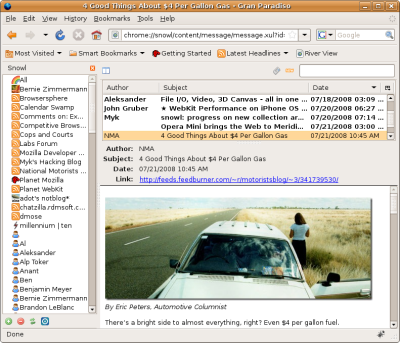
Traditional three-pane view
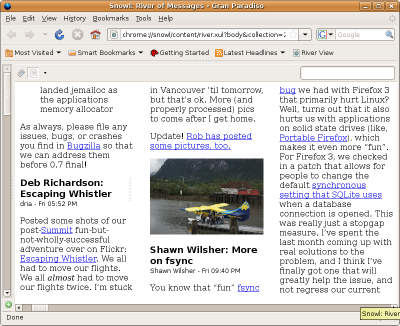
River of news style view


Recent Articles
- How To Download HBO Shows On iPhone, iPad Through Apple TV App
- Windows 10 Insider Preview Build 19025 (20H1) for PC Official Available for Insiders in Fast Ring – Here’s What’s News, Fixes, and Enhancement Changelog
- Kaspersky Total Security 2020 Free Download With License Serial Key
- Steganos Privacy Suite 19 Free Download With Genuine License Key
- Zemana AntiMalware Premium Free Download For Limited Time